

How to Increase Pageviews and Reduce Bounce Rate in WordPress
Posted on August 12th, 2018
Before we start
Lets cover some basics regarding terminology and technology. Bounce rate represents the percentage of visitors who enter your site and “bounce” (leave the site) rather than continue viewing other pages within the same site. Page view is a request to load a single page on an internet site. We use Google Analytics to track our data. You are welcome to use another analytics service, or you can simply install google analytics in your WordPress site.
Now that we have taken care of the basic terminology, you are probably wondering why the heck do these numbers matter?
If you are running a site that is primarily monetized by banner ads, then the number of pageviews matter. If you are trying to build a loyal audience, then the number of bounce rate matters. Also the lower your bounce rate, the better ads eCPM (cost per thousand) or CPC (cost per click) you will get. When the same user views the next page, your ad provider most likely has a better ad to serve them thus giving you a higher eCPM or CPC.
We have consulted with a lot of clients helping them increase their pageviews and reduce bounce rates. We have also done a lot of experiments on our own sites like List25. So all the methods that we will share are the ones that we have used in the past and know that they work.
P.S. These techniques will ONLY work if you have Good Content.
[video_page_section type=”youtube” position=”default” image=”http://track-n-test.com/wp-content/uploads/2018/08/youtube-banner1.jpg” btn=”light” heading=”” subheading=”” cta=”” video_width=”1080″ hide_related=”false” hide_logo=”false” hide_controls=”false” hide_title=”false” hide_fullscreen=”false”]https://www.youtube.com/watch?v=lxgE4HgXJ1g[/video_page_section]
Interlink Your Posts
Anytime that you can interlink your other posts within the post content, you are going to see an increase in pageviews. In WordPress 3.1, interlinking got even easier because you can simply search for the post you want to link while adding links. Interlinking techniques work great when you have a site with a lot of articles. If you are just starting out, then you will be a bit limited. So how do you go back and interlink older articles when you have something new? You can manually do it, but it will take some time. There are plugins that lets you automatically link keywords in WordPress (Although that article is showing you how we did this for affiliate links, you can use it for internal linking purposes as well). Not only does interlinking help you increase pageviews and reduce bounce rates, it also helps with SEO as well.
If you want to see an example of interlinking, then just look at the paragraph above.
Show Related Posts After the Post
One of the main reasons why the user leave your blog after reading the post is because you are not showing them what to do next. By showing the user with a list of “related posts” or “other popular posts”, you may get them to go on to visit another post in your site. There are a lot of ways you can add related posts to your blog. You can use a plugin called YARPP that has its advanced algorithm that picks the related post. You can show related posts by category or tags without using a plugin. You can also show related posts by showing other posts by the same author.
Show Excerpts on Front / Archive Pages
Showing excerpts on front/archive pages have two advantages. First, it decreases page load time. Second, it helps increase the pageviews. You should almost never show full posts on your front page or archive page. Imagine having like 25 images in one post, and then have 5 of those on one page. It would be a horrible user experience because of (slow load time and super long page) which would make the user leave your site. We have a tutorial on how to display post excerpts in WordPress themes. Most good theme frameworks like Genesis, Thesis, Headway etc. already have this option built-in.
[video_page_section type=”youtube” position=”default” image=”http://track-n-test.com/wp-content/uploads/2018/08/youtube-banner1.jpg” btn=”light” heading=”” subheading=”” cta=”” video_width=”1080″ hide_related=”false” hide_logo=”false” hide_controls=”false” hide_title=”false” hide_fullscreen=”false”]https://www.youtube.com/watch?v=th_CMRGAmYw[/video_page_section]
Splitting up Long Posts
Are you writing a super long posts? Well, you can split it into multiple pages using the WordPress <!–nextpage–> tag in your post. Simply add it wherever you want, and your post will split into multiple pages. You can see an example of how we split our posts into two pages or even into five pages. You have to be very careful when doing this because if you do not have a sufficient amount of content on each page, then the user might get pissed of. We have seen a lot of big name sites like Forbes, NY Times, Wall Street Journal and others utilize this technique.
Interactive Sidebar
Your sidebar can play a crucial role in increasing pageviews and reducing bounce rate. You can show your popular posts in the sidebar. You can even customize it to show popular posts by week, month, all time. You can also show your most recent posts only on single post pages. We have seen sites that create custom images to navigate to specific posts of theirs. You can integrate other sections of your site in your sidebar for example look at our WordPress Coupons section or the gallery section in the sidebar.
Encourage Random Browsing
On List25 we created a feature called I’m Feeling Curious. When a user clicks on this button, they will be redirected to a random post in WordPress. We put the button in our header bar which was a very hot spot. After seeing good results, we ended up putting it on WPBeginner as well and called it Explore.
[video_page_section type=”youtube” position=”default” image=”http://track-n-test.com/wp-content/uploads/2018/08/youtube-banner1.jpg” btn=”light” heading=”” subheading=”” cta=”” video_width=”1080″ hide_related=”false” hide_logo=”false” hide_controls=”false” hide_title=”false” hide_fullscreen=”false”]https://www.youtube.com/watch?v=0j8RrMJ5oeQ[/video_page_section]
Results
When we started out List25, we faced a lot of criticism. People were saying that sites like these fail to grow because it is hard to keep a loyal audience. We asked around and a lot of people who had done something similar in the past reported that the bounce rate for a siimlar site was soaring in 80% range. Average user would view only one page per visit and leave. We started the site out to get some base data. Our bounce rate was in the 75% range. We slowly started implementing the changes mentioned above. Bounce rate decreased from the average of 76% to 42%. Our pageviews per visit increased to 2.79 / pages per visit. Average time spent on page went to the average of 3 minutes and 40 seconds << This is the average time spent for our 1 million unique visitors! What are you doing to increase pageviews and reduce bounce rate? Share with us.
Content retrieved from: https://www.wpbeginner.com/beginners-guide/how-to-increase-pageviews-and-reduce-bounce-rate-in-wordpress/.
How to Set Up Shopify Ecommerce Platform
Posted on August 3rd, 2018
Not without the reason, Shopify (our full Shopify review here) is one of the most popular online store solutions out there. It’s main benefit? For a very affordable price, it lets you build a functional online store all by yourself. And not just any online store … what I’m talking about here is a truly quality result. Something that looks and works just like a pro would have built it.
So, in this tutorial, we’re going to discuss how to set up your first eCommerce store on Shopify. We’re covering the entire process, from a blank canvas to a fully functional eCommerce store ready to welcome your customers.
(This guide – “How to set up your eCommerce store on Shopify” – has been written with the beginner in mind, no coding or website building skills needed.)
But first…
What is Shopify?
Shopify is a complete, all-in-one eCommerce solution. Once you sign up for an account with Shopify, it allows you to:
- Build your online store all by yourself.
- Pick a design that suits your needs.
- Pick a unique name and domain for your store.
- Add your products and their details (price, description, etc.).
- Process orders from your customers.
- Handle online payments through solutions like PayPal and others.
- Run special promotions, discounts, and sales.
- And much more.
At the same time, Shopify is a way more affordable choice than hiring someone to build the store for you. Not to mention that it’s also more reliable over the long haul (the software itself is constantly upgraded, and there’s great customer support available).
To learn more about the ins and outs of Shopify, and find out whether or not it’s the perfect solution for your specific needs, feel free to visit our review. There, we point out all the pros and cons of Shopify and discuss the most important characteristics of the platform.
Table of Contents
- 1 What is Shopify?
- 2 How to get started with Shopify
- 3 How to set up your first online store with Shopify
- 4 Picking a design for your Shopify eCommerce store
- 5 Setting up page content in your store
- 6 Important things not to forget
- 6.1 Selecting a domain on Shopify
- 6.2 Enabling online payments within Shopify
- 7 How to make your Shopify store public?
How to get started with Shopify
Although this might seem hard to believe at first, in order to get started and set up your eCommerce store with Shopify, all you need is an hour of your time.
First, go to shopify.com and click the “Get started” button:

After that, you’ll be taken to the sign-up form. Just a classic thing … you’ll need your email, password, and a name for your store. I went with “Hats R Great”:
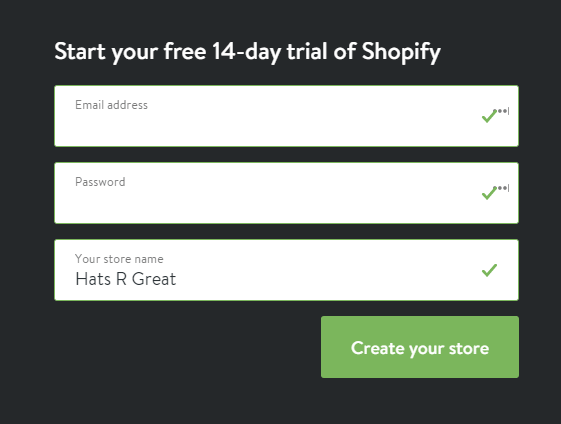
As you can see, there’s a free 14-day trial here, so you don’t need to spend any money to test things out and see if Shopify really fits you and your eCommerce store.
The next step is an important one from a legal point of view. Basically, if you want to operate like an actual store, you need to provide some details about your business.
Just a common web form:
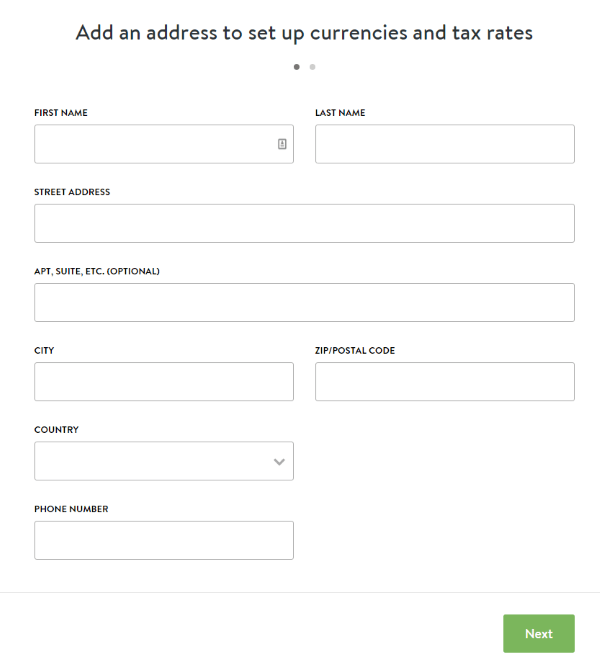
After you click “Next,” Shopify will ask you about a handful of additional business details. Based on what you select, Shopify will try to optimize your experience going forward:
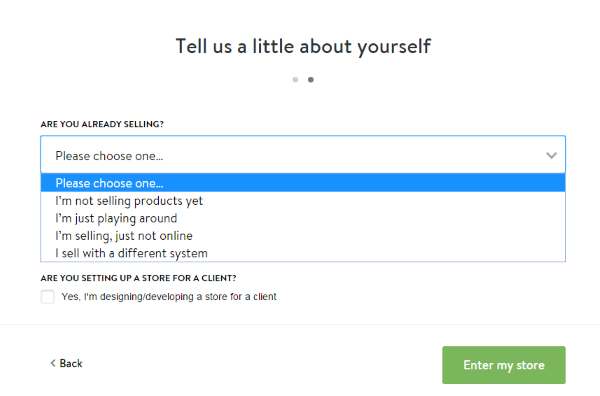
At this stage, it’s time to start setting up the parameters of your new eCommerce store on Shopify.
How to set up your first online store with Shopify
Let’s start with looking through the main dashboard of Shopify:
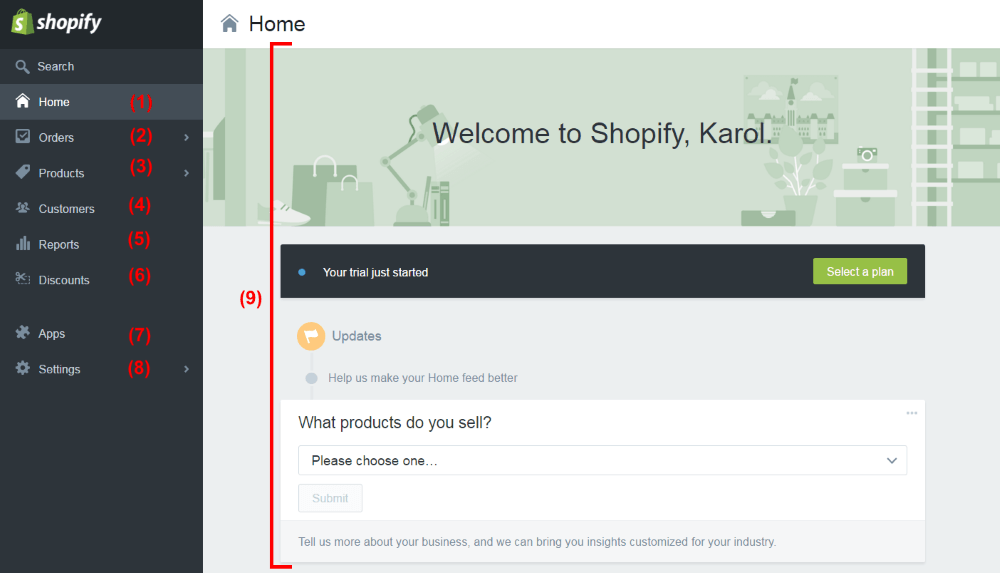
- (1) The homepage of your dashboard. It’s where you can get to the details of what’s going on with your Shopify store.
- (2) It’s where your first orders will show up, and where you’ll be able to manage every incoming order.
- (3) It’s where you can add and manage your products, inventory, product collections, gift cards.
- (4) It’s where you can manage your customers and every piece of info you have about them. This includes their past orders, their personal details, their stats (e.g. sales volume), and much more.
- (5) It’s where you can generate all kinds of reports about your store’s performance.
- (6) It’s where you can create discount codes and distribute them to people.
- (7) It’s where you can install new apps and extend Shopify with new functionality. Really cool stuff. For instance, you can install an app for SEO, for email marketing, and so on. Particularly useful for advanced users.
- (8) This is where all settings related to the store can be found. This includes things like your personal info, payments settings, checkout settings, taxes, shipping, and more.
- (9) The main screen of each panel.
Let’s stop on that last item for a minute. When you visit the dashboard for the first time, Shopify will present you a list of actions that you can take to fully customize and launch your store to the public. Let’s do that.
In the case of my new store, here’s what Shopify tells me to do:
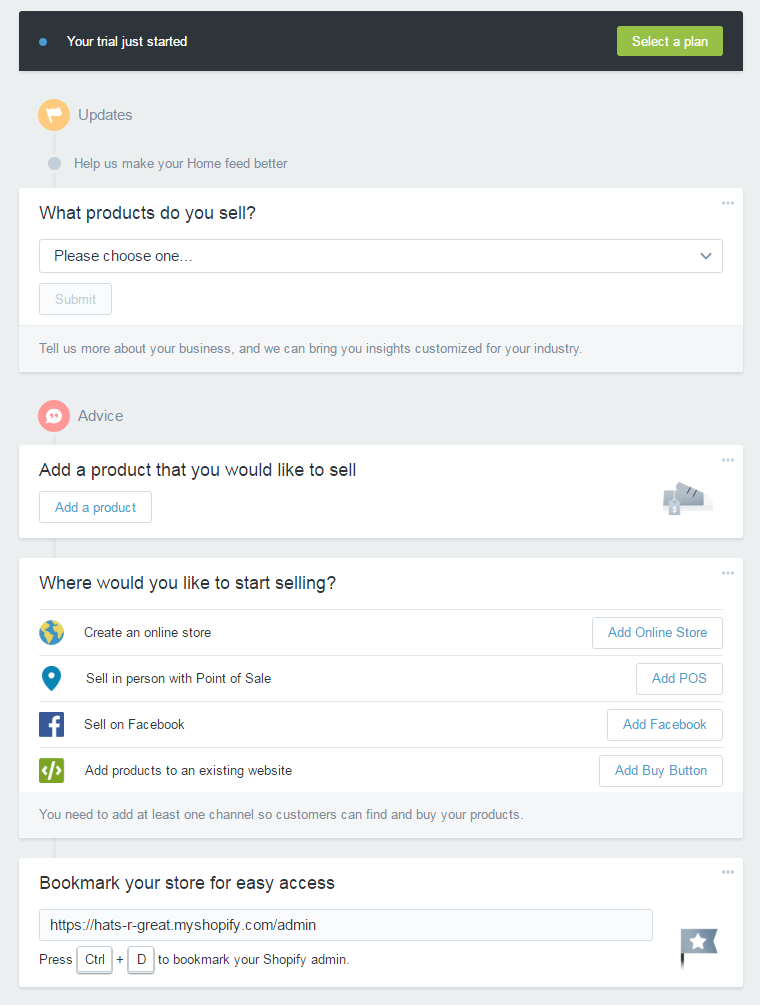
- From the first drop-down, I’m going to select “Fashion and Apparel.”
- Then, I’m going to add my first product. Just click on the “Add a product” button that you can see above. Shopify will then take me to the “Add product” page, where I’m able to complete the process:
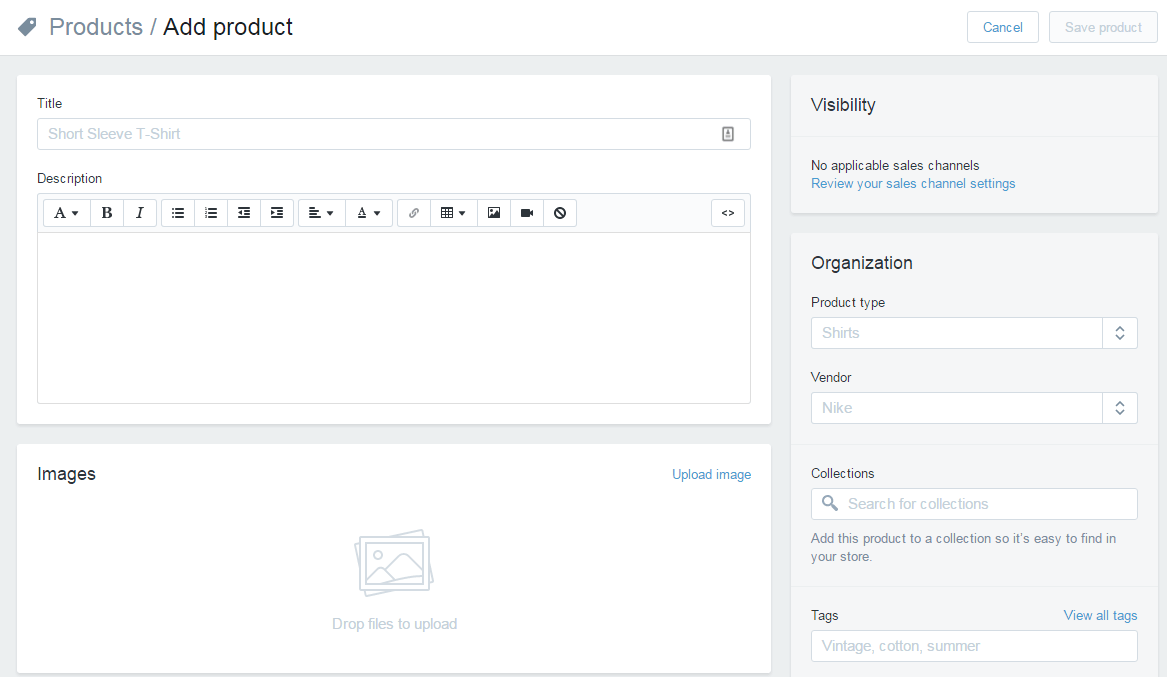
I’m calling my first product “French Bulldog Hat.” I’ll add some description, plus a picture of the hat.
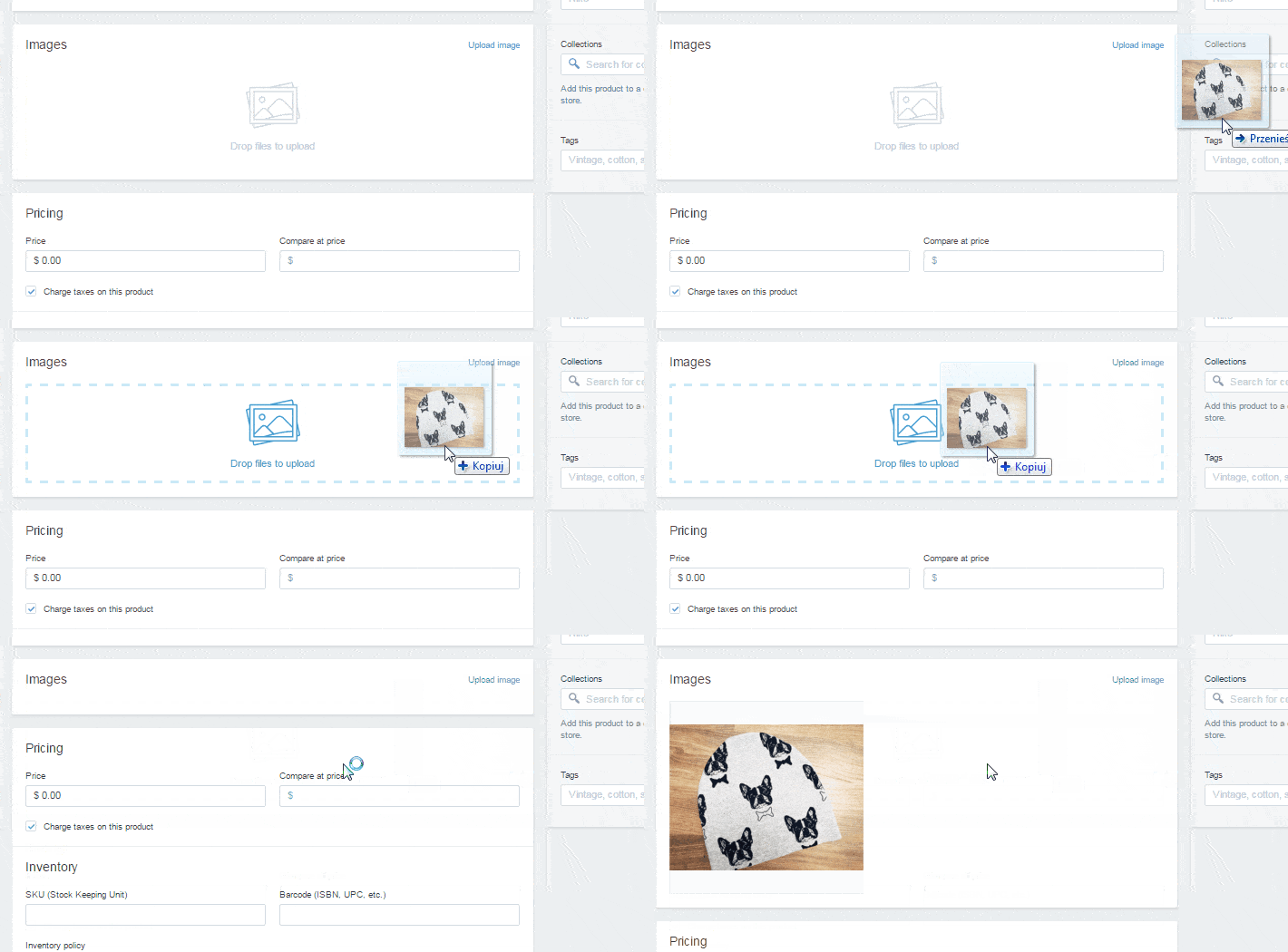
The nice thing here is that adding images works through drag-and-drop. So just take an image from your desktop, and drag it onto the section marked “Drop files to upload.” Like so:
At this point, you can set legal parameters such as taxes, shipping variants, and also set your inventory (but that’s all optional).
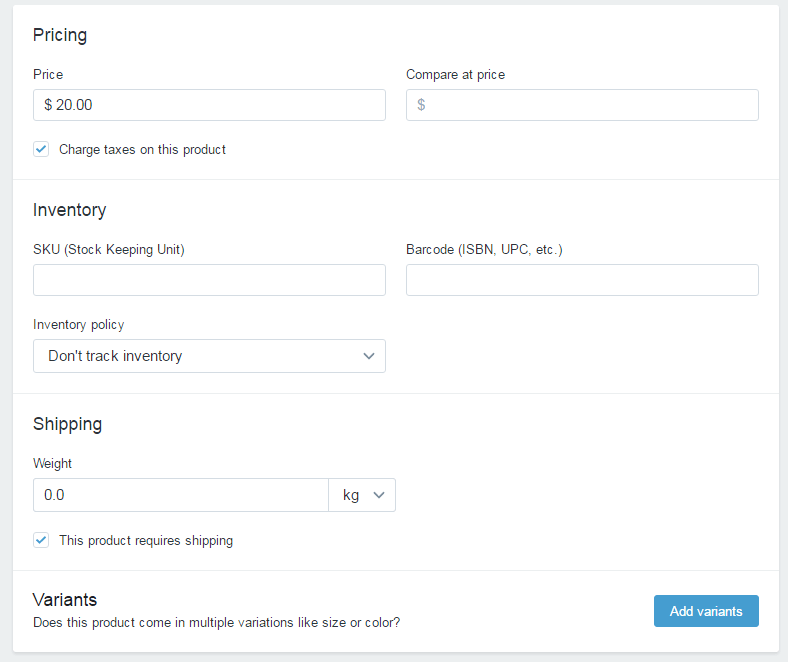
When you’re done, just click on the “Save product” button.
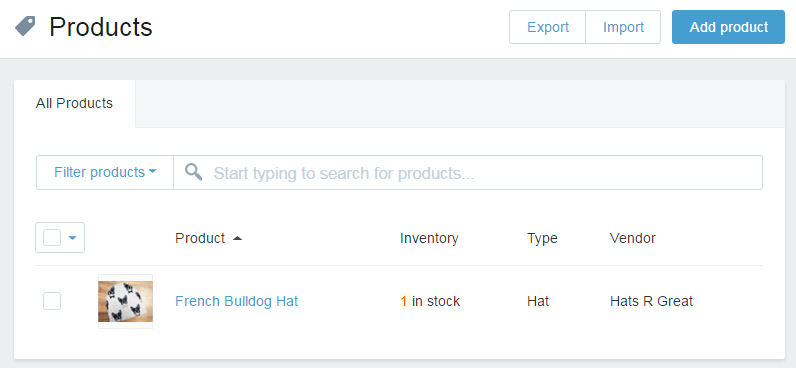
If you go to your products list right now, you’ll see the first product just waiting there to be bought!
Okay, let’s come back to the dashboard now and take care of the remaining settings of our eCommerce store on Shopify (the “Home” link in the sidebar).
At this point, we have an option to:
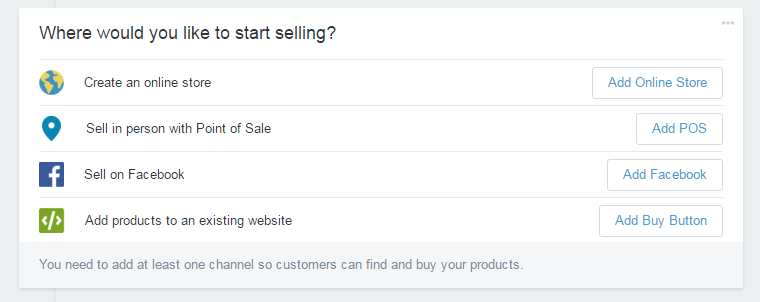
From those four, the most useful option is going to be “Create an online store.”
The remaining three are about, respectively, selling products in person in your actual brick-and-mortar store (Shopify can help with that too), selling directly via Facebook, adding stand-alone single products to your website outside of Shopify (this means that you can, for instance, add a buy button to your WordPress blog).
I’m just going to click on “Add Online Store.”
Picking a design for your Shopify eCommerce store
This is what you’ve been waiting for … it’s time to pick a design for your new eCommerce store:
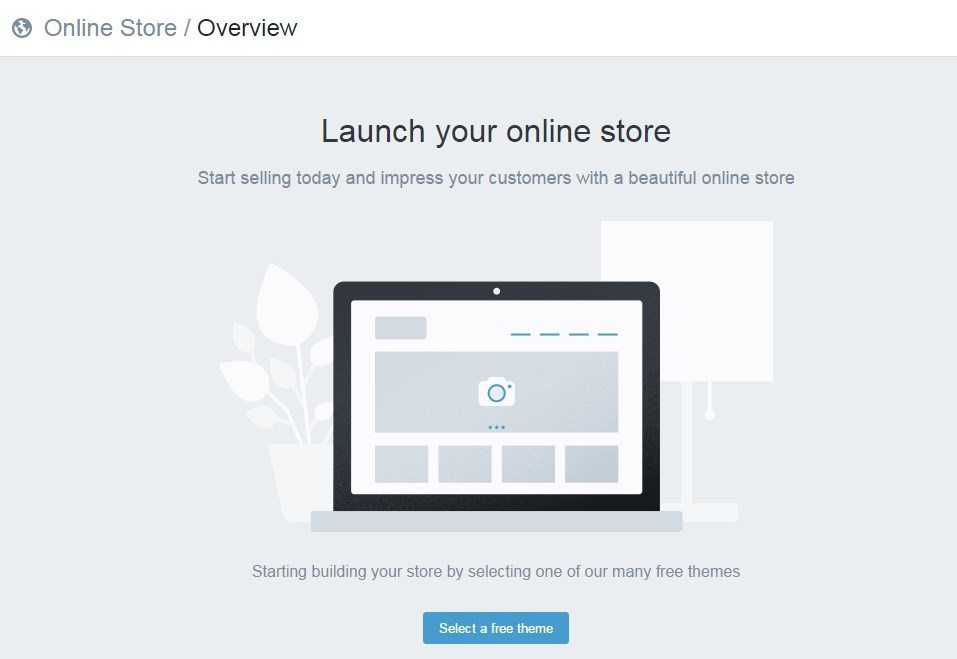
Let’s start by clicking the “Select a free theme” button.
Shopify offers a load of great-looking free designs. All you have to do is just pick one. No design skills needed at all to launch a truly good-looking eCommerce store on Shopify.
Okay, so browsing through what’s available:
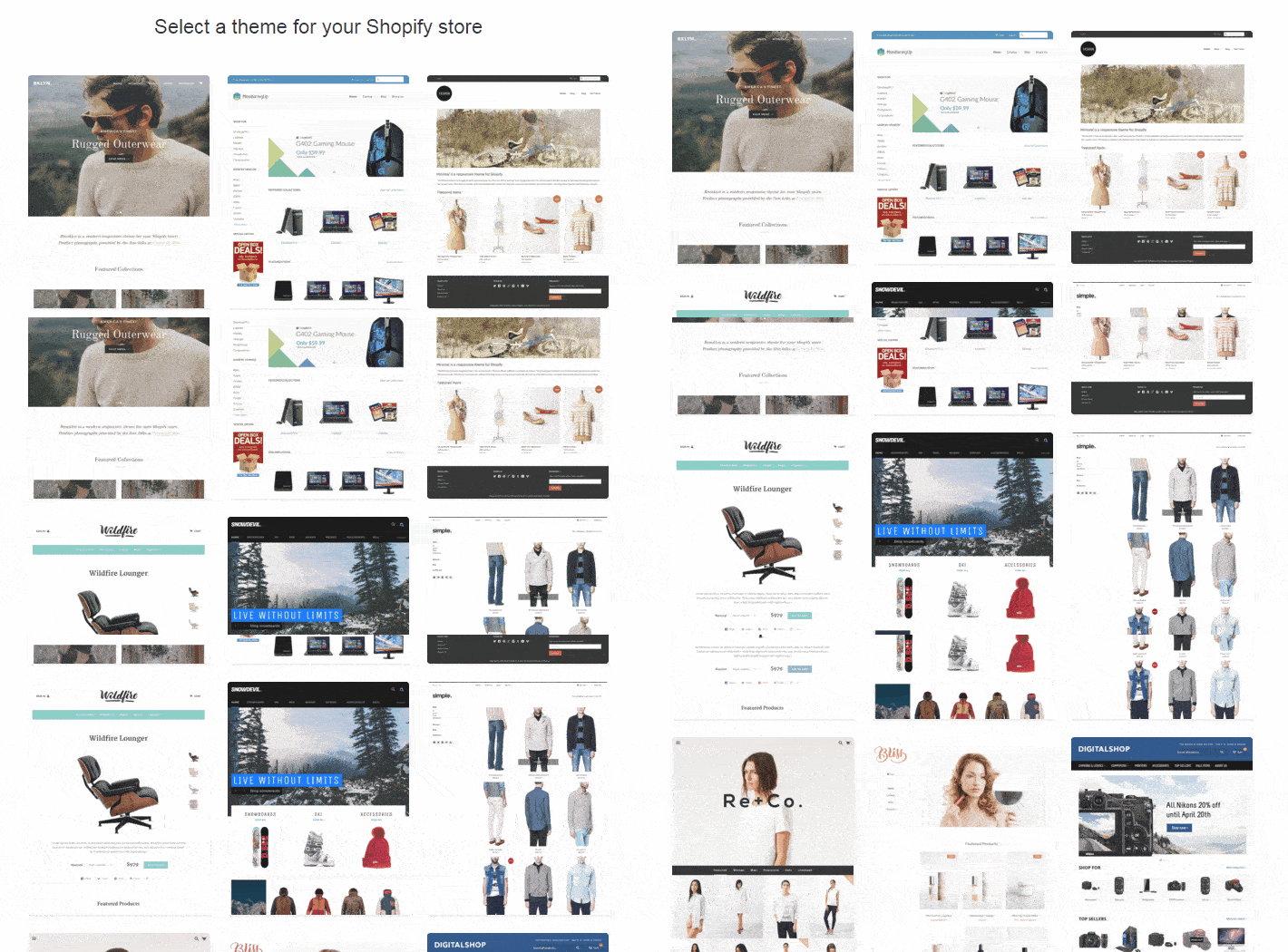
… I think I’ll go with the one simply called … “Simple”:
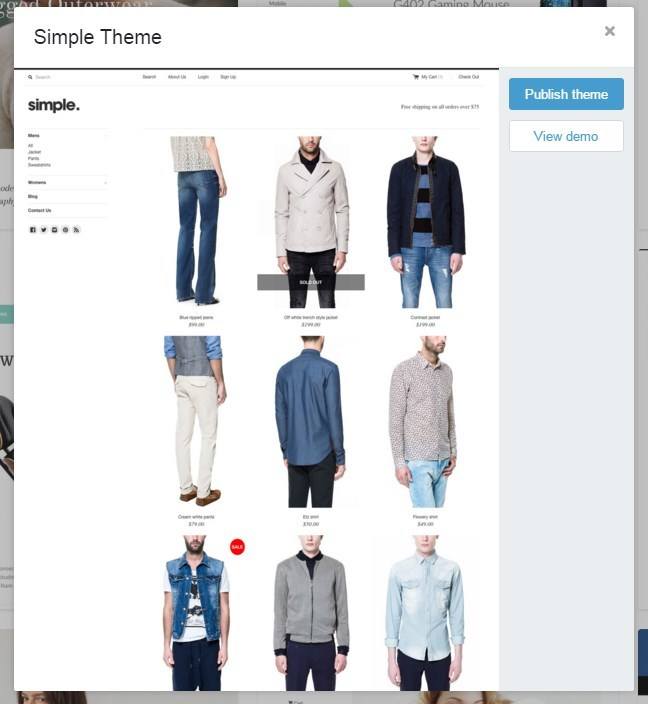
(Note. Every design offered by Shopify is optimized to be viewed on desktop, mobile and tablets. Also, when selecting your design, please don’t worry about the kind of products that are showcased in the theme’s demo. Those are just examples. After you launch your store, you can sell whatever you wish through any of the themes.)
At this point, let’s just give the “Publish theme” button a click, and your design will be set.
In the next step, Shopify will present you an example of what your store looks like, along with its appearance on mobile.
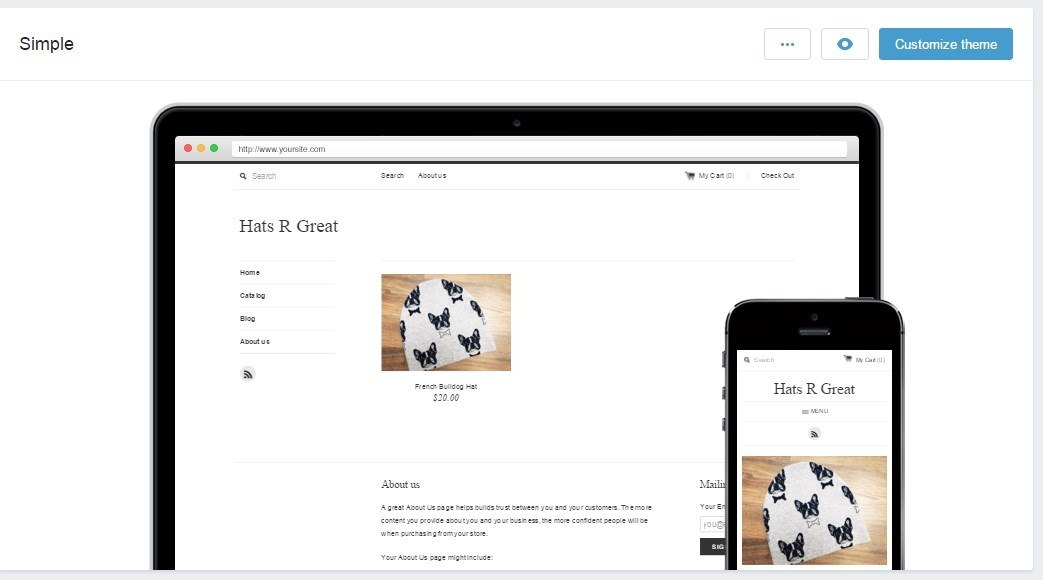
If you want to, you can click on the “Customize theme” button to adjust the design you’ve selected. There’s a couple of handy options here, and I invite you to experiment with them on your own, but let’s just point out some basic details. Here’s the customization screen:
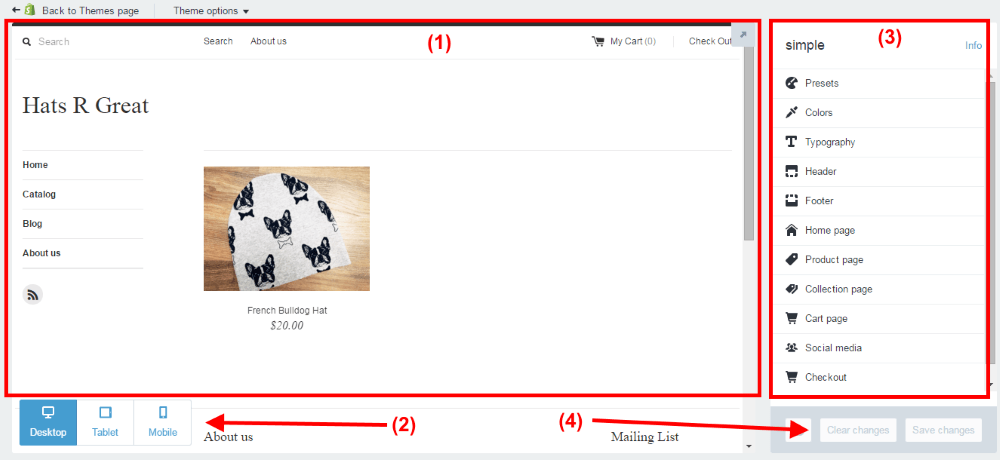
- (1) The main view of your eCommerce store on Shopify – this is what it currently looks like.
- (2) The device switcher – see what your store looks like on desktop, tablets, and mobile.
- (3) The options panel – this is where you do your adjustments.
- (4) The saving panel – save or cancel your changes there.
Right now is a good moment for you to go through the options panel, section by section and experiment with what’s there.
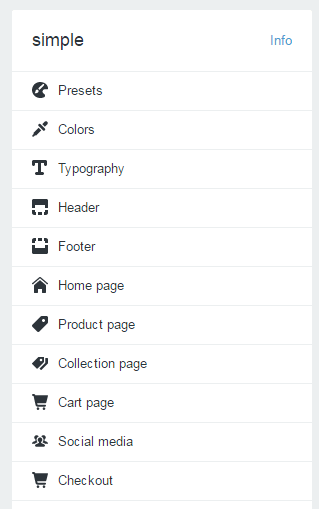
For example:
- Go into “Presets” – see if you like any of the pre-made variants of the theme’s design.
- Go into “Colors” – set the colors for your text, icons, headings, and etc.
- Go into “Typography” – change the default fonts (it’s the easiest way to give your store a unique look).
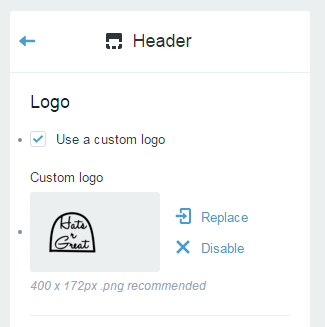
- Go into “Header” – set the logo that’s going to appear on your Shopify store. Like so:
- Go into “Home page” – choose a banner image for your store. Like so:
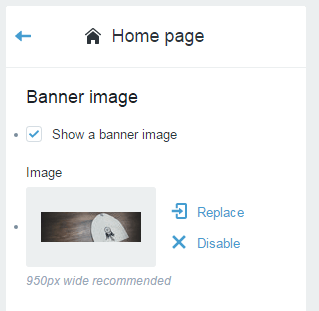
- Go into “Social media” – link your Shopify store with your social accounts.
When you’re done having fun there, just click the “Back to Themes page” link:

Setting up page content in your store
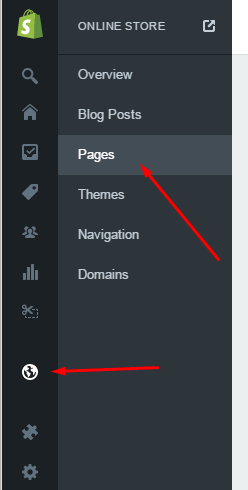
So, with the products and the design handled, let’s now include some texts onto your pages. Particularly, the homepage. For that, let’s go to Online Store / Pages (from the left sidebar):
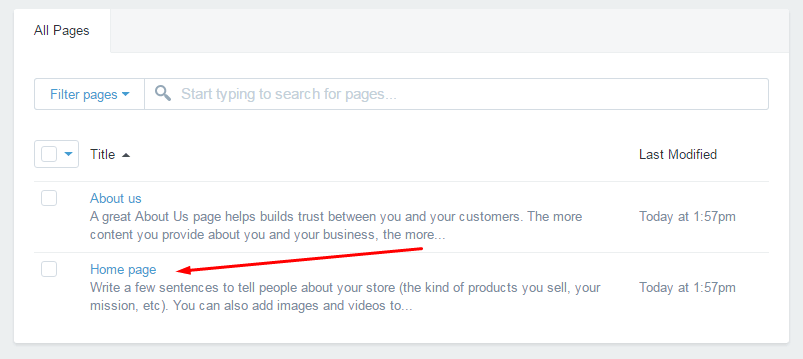
Once there, click on “Home page”:
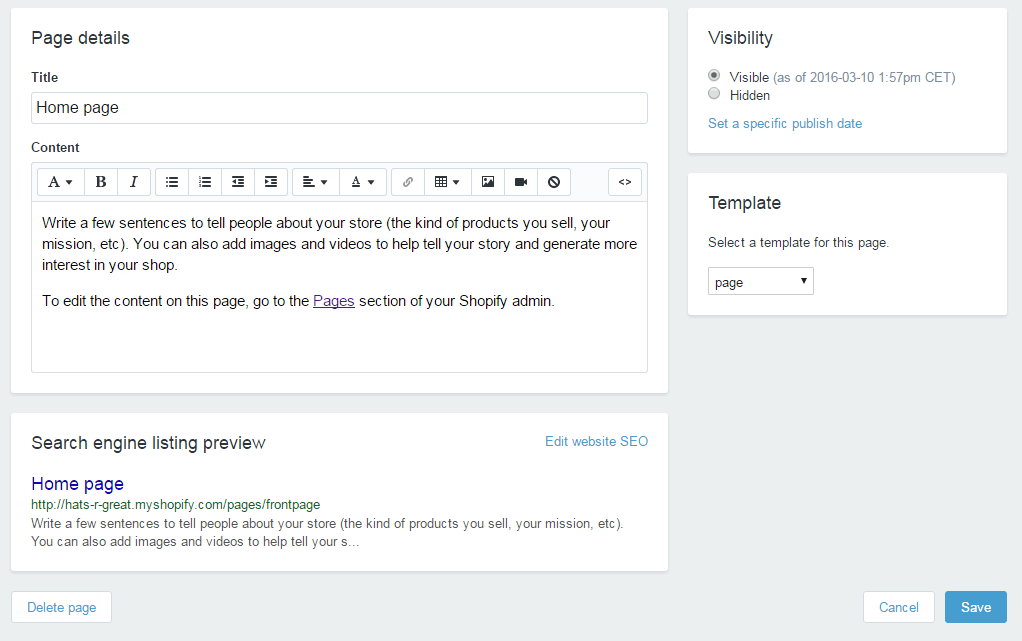
This is where you get to write a few sentences about your store:
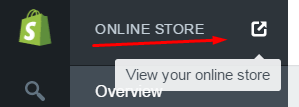
After you’re done with all that, you can save your homepage and see what your store looks like. At any stage, you can do that by clicking this icon:
Important things not to forget
Right now, you’re done with the basic process and you’ve learned how to set up your eCommerce store on Shopify. But there’s still a couple of required steps to get your store officially ready for customers.
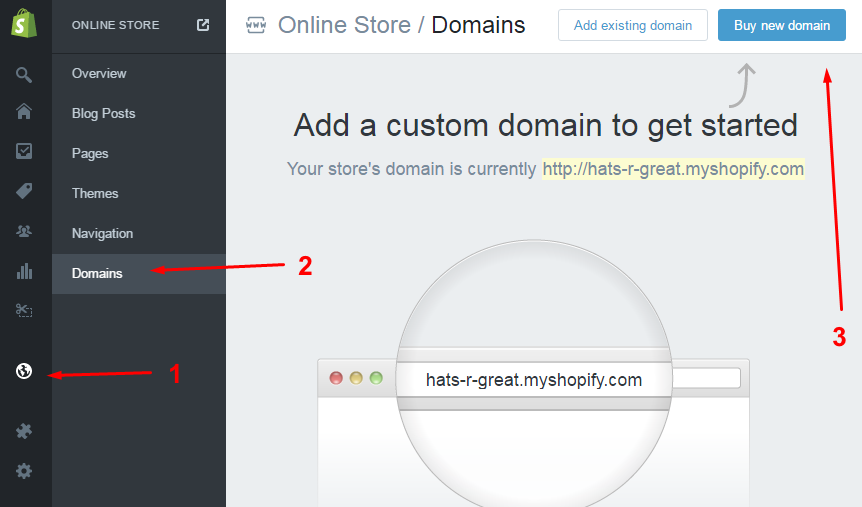
Selecting a domain on Shopify
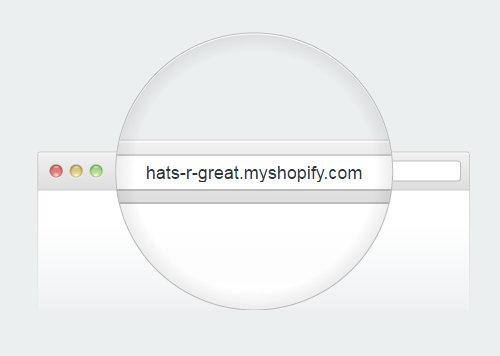
By default, your store gets a subdomain, like:
You can upgrade to a standard, custom domain right through Shopify. Just click the “Buy new domain” button, and Shopify will guide you through the process:
Enabling online payments within Shopify
Before your customers can buy anything, you need to integrate your store with an online payments gateway. This can be done in Settings / Payments.
By default, Shopify comes integrated with PayPal, it lets you accept credit cards through various other gateways, and also provides you with a handful of alternative payment methods.
The easiest way to get started is certainly working with PayPal. Shopify actually handles this out of the box for you. No need to adjust anything, as long as you use the same email address for your Shopify store and your PayPal. If not, you can change this in the settings by clicking the “Edit” button:

After every sale, Shopify will credit your PayPal account automatically.
How to make your Shopify store public?
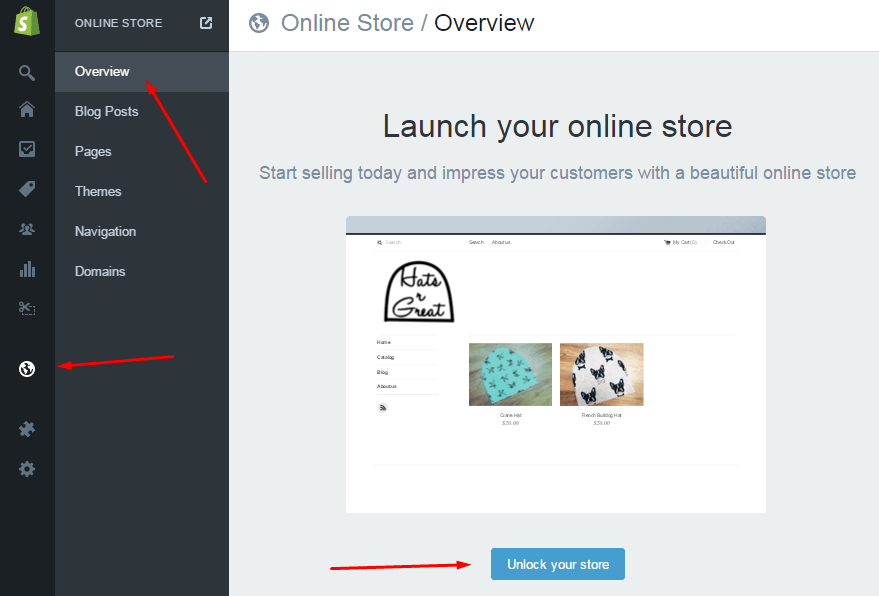
The last step on your way to setting up an eCommerce store on Shopify is to make it public. To do so, go to Online Store / Overview, and click the “Unlock your store” button:
After your 14-day trial is up, you’ll have to select one of the available plans with Shopify to continue operating. The current options are:
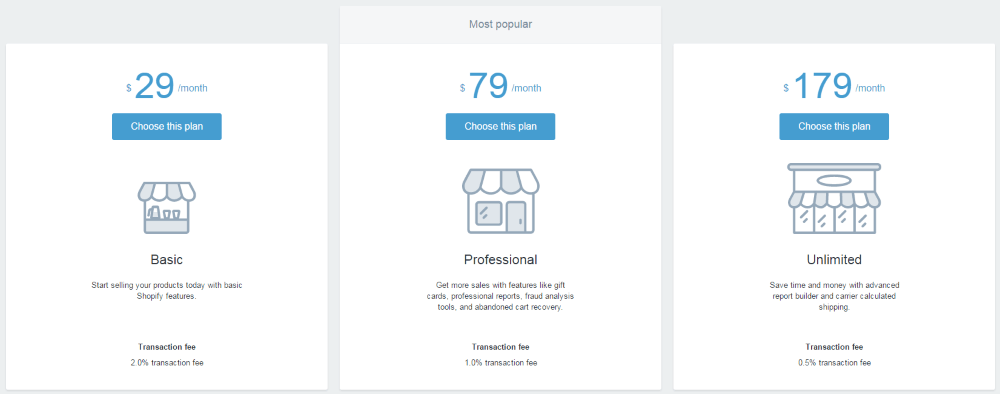
And that’s it! Right now, your new eCommerce store on Shopify is up and running. Shopify takes care of all of your products, sales, orders, and the overall appearance of your online store on the web.
So what do you think? Willing to give Shopify a try? Or maybe you have any questions related to how to set up your eCommerce store on Shopify?
Content retrieved from: https://ecommerceguide.com/guides/setup-shopify-store/.
5 Ways to Increase Ecommerce Sales with Instagram Marketing
Posted on July 20th, 2018
The Growth of Artificial Intelligence in Ecommerce (Infographic)
Posted on July 19th, 2018
How E-Commerce Marketing Will Evolve in 2018
Posted on June 24th, 2018
Six months into 2018 and we are seeing another an excellent year for the e-commerce market. Social networking, multichannel trade, last mile delivery, and several other new-age company models led to $409 billion in e-commerce earnings in 2017. All things indicate that in 2018, this years sales figure could surpass $460 billion.Let us take a look at some probable contenders which can become 2018 & 2019’s big e-commerce trends:

Voice search
Lengthy text-based conversations with Chatbots are not that convenient and texting isn’t as natural for humans as speaking. With Amazon’s Alexa, Apple’s Siri, Google’s Voice Assistant, Microsoft’s Cortana and Samsung’s S Voice already being a big hit, it’s easy to conclude that possibilities with voice are endless. Clients are gradually receding from a keyword-based research on e-commerce sites. Today, 13 percent of U.S. homes have a smart speaker, and 36 percent of those homes regularly use the device to make purchases.The tendency of voice hunt will get more powerful in 2018 and 2019 as more U.S.-based clients, in addition to global clients, will purchase smart home supporters.Native language processing, AI, and the IoT will also add growth to voice-based e-commerce business. The Walker Sands 2017 Future of Retail Study found that more than 19 percent of 1,600 U.S. consumers have already made an online purchase using voice commands.

For online shop owners, this may pose a fresh challenge. They need to up their game to match and function client voice commands. As an example, if you’re a site which sells online fashion clothes, the shop should have the ability to understand long-tailed voice orders that cite the item name and possibly some details.As of mid 2018 voice is still emerging into mainstream but we can expect rapid consumer uptake once the benefits are apparent to shoppers. Search queries using voice commands will see an upward trend.Products currently being shopped by voice are lower value items, bought as a one-time purchase. Grocery (20%), entertainment (19%), electronics (17%), and clothing (8%) are the top categories of purchases. Meanwhile, only 39 percent of the consumers say they trust the personalized product suggestions from the smart speakers, and most people are just buying something they already know.
Chatbots and messengers
- 1 in 5 consumers would consider purchasing goods and services from a chatbot.
- 40% of consumers want offers and deals from chatbots.
- Consumers are willing to spend more than $400 through a chatbot.
Thanks to chatbots, artificial intelligence isn’t just for cutting-edge tech companies like IBM Watson and Google. Chatbots can come with a mix of natural language processing, machine learning, and live operators to perform all sorts of tasks that help businesses better serve their customers. They’re growing in popularity on Facebook Messenger, Skype, Slack, Kik, and other messaging platforms.From toll-free numbers to live chat, the next big leap that e-commerce marketing will take in 2018 will be chatbots. Chatbots provide a personal way of interacting with customers.eBay first started using chatbot technology by piloting a simple Facebook Messenger tool that reminds bidders 15 minutes before an auction listing is about to end. That way, they can remember to get a last-minute bid in.

Now they’ve expanded to offering ShopBot, a virtual personal shopping assistant that helps people find items they want (at the price they want) on eBay.For online shop owners, this translates into two big advantages: It saves a lot of cash that otherwise would have to understand consumer preferences from information.Small and medium scale businesses that are not able to invest in high-end chatbots can bank on Facebook Bots and similar cost-effective services. These intelligent messenger bots can do many automated tasks like personalized product suggestions, offer customized offers, notify of price drops and so on.With clever coding the existing technologies can be made into very capable digital assistants.
Unified Commerce

Online shopping indicated the doom of physical shops and malls. A high number of shopping malls in the USA are already shutting down. Internet shopping has stayed mainstream for the previous couple of years.In 2017 a new trend started taking shape that will become more prominent in 2018 and beyond.That’s the tendency of multichannel e-commerce. In multichannel e-commerce clients would have the choice of purchasing online and picking up their bundles via an offline destination.Not any different from ordering over the phone but Unified commerce goes a step ahead and connects all the components of e-commerce real-time. The mobile, web and the offline store—everything is brought under a single umbrella under unified commerce. Speaking of phone ordering Google has some new technology in that department also.
Video marketing
It is now the present. Video has launched its way to online shop banners and perhaps even individual product pages. Long-written product descriptions tend to be perplexing and just somewhat hard to comprehend. Even though they provide an SEO advantage, media advertising provides an upper hand over textual content using infinite reusability.Additionally, clients are more interested in seeing than studying about a product. Video marketing statistics demonstrate that videos will help attain click-through-rates around 200 to 300 percent over other kinds of articles.New kinds of media such as video are also becoming ever more common. We have smart homes in 2018 but we dont yet have smart retail in its full glory. Retail kiosks are common in 2018 but lack the richness of the emerging smart technologies.
Augmented reality
Augmented Reality in eCommerce could change things around for both customers and retailers. For clients, AR would make informed decisions which are best suited to their wants and aspirations.The IKEA Place App is an excellent example of this. It helps customers to place furniture within their spaces to understand whether the measurements are true or not. A similar app would be great for designing kitchens. IKEA even asserts that the program provides a 98 percent accuracy in setting furniture digitally in spaces. More online shops will definitely follow because this helps bring in more cost-savings from product returns in the long term.
So what will happen in 2019?
Along with chatbots, Artificial Intelligence will proceed to boost eCommerce by supplying smart product suggestions. These merchandise suggestions will be attuned to client pursuits like colour, dimensions, complete-the-look options and so forth. The AI system will derive ideas based on historic shopping habits of their client in addition to according to patterns of continuing trends.Along with the aforementioned, various other tendencies and practices of 2017 continue to be prominent in 2018. For example, all online shops would need to implement HTTPS since cybersecurity and SEO standing will come to be entirely reliant on these. Many of the API’s behind the apps also require HTTPS. It may be that in a few years HTTPS replaces HTTP. Online stores can’t skip the choice of investing in an SSL certification. They’ve become essentials to conduct an internet shop. Additionally, clients become more conscious of safety measures and how they affect their purchasing experience.

Along with voice search, augmented reality, artificial, intelligence and security, e-commerce is all set to reach a new level of experience in 2018. Get ready to be surprised by your favorite online shopping websites. Expect physical retail and the online shopping experience to merge as the smart home trend spills into smart retail.Global revenue from artificial intelligence is expected to grow rapidly from $643.7 million in 2016 to $36.8 billion by 2025. And by the looks of things, ecommerce brands will take a fair share of the pie.

Craving Yellow a young Kenyan creative innovator’s authentic soul-searching blog Will Inspire You To e-commerce success.
Posted on June 21st, 2018
She’s articulated, smart and self-aware.”I think my journeys have matured me,” she says. “Sometimes I believe I’m 30 years older than I really am.”Tongoi needed to be independent from a young age as she moved away from home, to South Africa for education, at age 17. Then it was off to the US for additional studies in political science and then to Australia for her first job — where she changed direction into social network marketing and online community administration. She finds herself back in her home country of Kenya, occupied nurturing a growing company that began when her creative character sought an outlet on the journey of self-discovery she found herself undertaking.While in the US she struck pieces on the self-portraiture of women of color and what it meant to be embodied in the manner that they were.Today Craving Yellow is surely a success by any blogger’s standards

How can you turn a successful and authentic online presence into a profitable business venture? In Tongoi’s case: By diving head-first into the opportunity, without being quite fully prepared.”It has only been four months!” She chuckles as she shares the story. In her interactions with local businesses in this area she began gaining an awareness of the business and one of her mentors asked why she wasn’t producing her own merchandise to fulfill consumer needs.This was the birth of her Craving Yellow beauty box — a product which combines the ease of carefully chosen beauty products for natural hair care and information about the best way best to stick to the treatment regime.She spent about 750,000 Kenyan shillings (US$7,400) on the goods for its first consignment of boxes using an eight-week payment arrangement.

“It was a massive risk I took. I have done no market research. I took on these products on a verbal agreement, without a contract in place. I don’t consider myself a pro marketer. However, I did sell them in eight months,” she says.Observing that very first sales drive, a follower in the US commented on her blog asking if she could buy the beauty box. Her site platform was e-commerce allowed, but she had no agreements or plans for international delivery.”I started calling different providers for transport after the orders were ready, but then got a call from Vicky Wambui from DHL, inviting me to get a meeting,” Tongoi states.The DHL Express team were quite hands-on. They spoke Tongoi through all of the requirements and even physically helped pack the dispatch boxes at the same stage. A valuable negotiated shipping rate, provided because the organization believes in Tongoi’s vision, led to the present reality where one in every five boxes currently ordered is for international shipment.Considering that the item is a luxury high-end beauty box selling for 5,000 Kenyan shillings ($49), this has increased Craving Yellow’s potential market and made the company instantly more viable.

Tongoi admits that she’s not the stereotypical small business type. She is, at her heart, a creative person. For my organization, I think if I keep the human desire at the middle, the money will follow along with that the money is just like a thank you for the support provided and that really meets that a need has been there,” she says.In a really short space of time Craving Yellow has evolved from being a popular blog to becoming a new for organic beauty product customers — offering specially curated goods in the beauty shop or workshops on the subject from the Craving Yellow classes.Lately Tongoi added her first branded merchandise — the Craving Yellow shampoo pub and lace bonnets. This is a collaboration with well-known firms in Kenya that have a strength in particular goods and then produce these items for her.”I feel that as we get the delivery arrangements perfect and the goods on offer precisely right, the worldwide buyers would readily supersede my regional buyers — they do have the buying power,” Tongoi states of their future plans.
AI offers exciting opportunities for ecommerce industry – expert
Posted on June 13th, 2018
Amazon Key is a new service that lets couriers unlock your front door
Posted on June 13th, 2018
You’ll need a smart lock and Amazon’s new Cloud Cam
Twelve years ago, Amazon launched Prime, a subscription service that entitled members to free two-day shipping in the United States. Since then, it has added a number of options to make delivery faster and more convenient. Prime customers can get same-day delivery, and drop off with an hour or two on some items. Of course, customers aren’t always home to receive their packages. So Amazon started putting lockers in nearby convenience stores and building lobbies. It even showed off drones that could drop the package right into your backyard. Today it’s taking the obvious next step and introducing a service that will allow Amazon couriers to open your front door and put your package safely inside your home.
The service is called Amazon Key, and it relies on a Amazon’s new Cloud Cam and compatible smart lock. The camera is the hub, connected to the internet via your home Wi-Fi. The camera talks to the lock over Zigbee, a wireless protocol utilized by many smart home devices.
When a courier arrives with a package for in-home delivery, they scan the barcode, sending a request to Amazon’s cloud. If everything checks out, the cloud grants permission by sending a message back to the camera, which starts recording. The courier then gets a prompt on their app, swipes the screen, and voilà, your door unlocks. They drop off the package, relock the door with another swipe, and are on their way. The customer will get a notification that their delivery has arrived, along with a short video showing the drop-off to confirm everything was done properly.
 The Amazon Cloud Cam and compatible locks Photo by Becca Farsace / The Verge
The system works with locks from Yale and Kwikset, two well-known brands. But the other piece, the connected camera, is made by Amazon, and that’s a really big deal. Amazon is pushing even further into the smart home space, a market it’s made big strides in, thanks to the huge popularity of its Alexa devices. Amazon’s Cloud Cam is a central piece of its Key service, but it’s also just a straightforward home security camera, one that can respond to voice commands and integrates with other Alexa devices. Amazon is planning to sell them in bundles and offer a subscription service for customers who want video archives and advanced home monitoring, putting the product in direct competition with Alphabet’s Nest brand and others in the smart home space, like Ring and Logitech.
Prime customers can preorder the camera today. The Key app and actual delivery service will become available November 8th.
All this raises a big question, however: will Prime customers trust Amazon to monitor their homes around the clock, and to know when it’s okay to unlock their doors for a stranger? And will the benefit of having your packages delivered quickly and securely outweigh any concerns about privacy and security customers might have?
For $249.99, Amazon will sell you a bundle that includes a smart lock, the connected camera, and free installation. Once you have the system in place, in-home delivery will begin to appear as an option every time you order something on Amazon. There is no additional charge, and Amazon says the in-home delivery will be available on over 10 million items (anything that isn’t too big and bulky). The one caveat is that, for now, Amazon only trusts its own delivery team to handle this work. So Amazon Key is only available in 37 cities across the US where Amazon Logistics handles the drop-off. But the company says it hopes to expand the service more widely in the future. It will be interesting to see if it eventually allows third-party delivery companies to handle this sensitive process.
 Cloud Cam streaming on an Echo Show Image: Amazon
Amazon knows that it’s asking a lot of consumers with its new Key service. You have to really trust a company to let it record what’s going on inside your home at all times, and even more to unlock your door for strangers. So it tries to make sure the process is minimally invasive and totally transparent. Customers will get a notification the morning of a delivery, with a window of time when they should expect Amazon to arrive. They will get another notification when the delivery van shows up. That means you can start watching a live stream of the delivery on your camera if you want to keep an eye on things.
Even if you choose in-home delivery, couriers are instructed to ring the bell or knock on the door first. That’s meant to let people inside know someone is entering, and also give the delivery person a chance to check for potential hazards like angry dogs. Couriers are instructed to open the door as little as possible, slide the packages in, and not enter the home if possible.
While Amazon isn’t going to allow any third-party delivery services to get inside your house with Key (at least not at launch), the company is hoping that you’ll use Key when ordering stuff like dog walking or kitchen cleaning from its Amazon Home Services division. In the coming months, it says Key will be integrated with over 1,200 service providers across 60 professions. You’ll log on to the website or app of a service like Rover.com or Merry Maids, and there will be a button offering the option for in-home service through Amazon Key.
Amazon’s Cloud Cam and a compatible smart lock are essential ingredients for in-home delivery. But the company is hoping you’ll use these devices for other things as well. The Key app is designed to make it simple for you to grant access to trusted friends and family. You can give permanent access, a one-time pass with a time limit, or recurring access that works on certain days and at certain times. You can grant access through the app or send permissions via a simple SMS message.
Individual Cloud Cams cost $120, but Amazon says it will be much cheaper if you buy them in bulk. Its forthcoming subscription service will allow you to archive and review footage and activate high-end features like motion detection, people detection, and zone monitoring. It’s integrated with Alexa, so if you were down in the basement, you could ask Alexa to show you who’s at the front door. For now, it’s billed as an indoor security camera, and won’t work if left outside in the rain.
While Amazon’s foray into smartphones flopped, it staged a coup with the introduction of Alexa, vaulting to the front of the pack when it comes to smart home gadgets. Alexa was thestar of the show at CES for the past two years, finding its way into a wide range of products. Amazon has been aggressively pushing out more Alexa devices this year, everything from wardrobe assistants to alarm clocks. The Amazon Look is probably its most daring product; a camera that’s meant to live in your closet and watch you change clothes requires a very high level of trust. But so far, Amazon has limited access to this device, which is still available for purchase by invitation only.
That makes Amazon Key a crucial stepping stone in Amazon’s quest to manage your home life and integrate itself into your daily routine. Prime customers, of which there are now anestimated 85 million, may sign up for the service because they’re interested in the convenience and security of having their deliveries left inside their homes. But in the process, they would be positioning Amazon to know a lot more about their lives and habits, like when they leave the house in the morning, how often they go on vacation, and when they get back from work at night.
Amazon Key feels like a major test of how thoroughly the company has earned customers’ trust, and a harbinger of a future where tech companies mediate every aspect of our lives. Of course, if you’ve already got an Alexa alarm clock keeping an eye on you at night, maybe it won’t seem like such a leap.
By Ben Popper Oct 25, 2017, 7:00am EDT
https://www.theverge.com/2017/10/25/16538834/amazon-key-in-home-delivery-unlock-door-prime-cloud-cam-smart-lock