



Top 50 online retailers in the UK: Argos reclaims second place from Apple
Posted on August 21st, 2018
[This an old post from 2012]
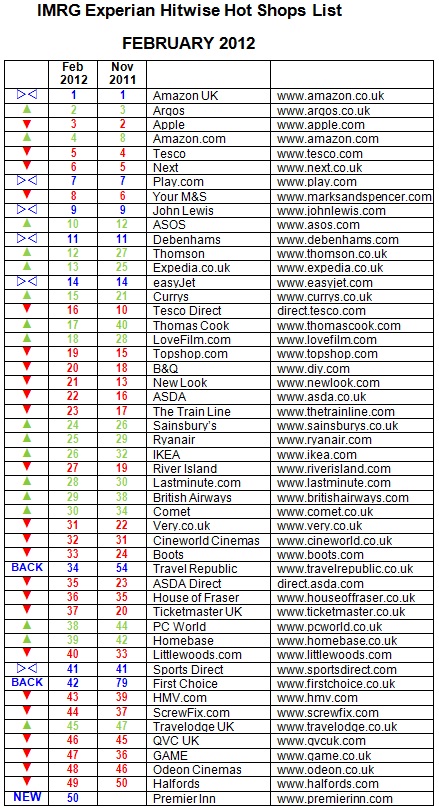
Argos is the second most visited online retailer in the UK behind Amazon, reclaiming second place from Apple, according to new data. The research, from Experian Hitwise and IMRG, indicates that Electronics retailers Currys (ranked 15), Comet (30), and PC World (38) all rose up the Hot Shops list this quarter.
Currys and PC World were also ahead year-on-year, up two and three places respectively on February 2011.
This quarter’s five fastest movers in the Hot Shops list were all travel brands. First Choice (up 37 places), Thomas Cook (+23), TravelRepublic.co.uk (+20), Thomson (+15) and Expedia (+12) all climbed in the rankings. Outside of the travel industry the fastest movers were LoveFilm.com (+10), Currys (+6), IKEA (+6) and PC World (+6).
Travel’s winter peak in January saw eleven travel brands rise in the rankings within the top 50. Premier Inn broke into the top 50 for the first time this quarter, and TravelRepublic.co.uk climbed 20 places on November to come back into the top 50.
Analysis:
As expected, this was a strong quarter for travel brands with the five fastest movers of the last three months all coming from this sector. Much like last year, it was the multi-channel travel agencies First Choice, Thomas Cook and Thomson that were the fastest-growing travel sites, although the airlines easyJet, Ryanair and British Airways all rose in the rankings too. By this measure First Choice’s decision last year to switch to purely all- inclusive holidays seems to have paid off, as the travel agency was ranked four places higher this year than in February 2011.
Post-Christmas shopping this year produced the biggest ever day of online shopping, with 96 million UK internet visits going to retail websites on Boxing Day 2011. In January it was the electronics providers and home improvements retailers that saw big increases in online traffic as consumers sought out big ticket items such as TVs, laptops, sofas, wardrobes and bathrooms. Currys, IKEA and PC World all jumped six places in the Hot Shops list since last
quarter, while Homebase and Comet were also among this quarter’s rising websites.
Online-only brands also had a strong quarter. Four of the top 10 in the Hot Shops list this quarter are online-only, including fashion retailer ASOS which climbed two places to 10th position. ASOS was also one of four fashion brands including Next, New Look and Very.co.uk that improved on its position year-on-year. Video rental and streaming site LoveFilm.com climbed 10 places to 18th in the list.
James Murray, Marketing Research Analyst at Experian Hitwise commented: “Travel has done well this quarter despite some really challenging market conditions. In early December many of Europe’s ski resorts were struggling with a lack of snow and things were looking pretty bleak, but massive snowfall in mid-December restored confidence and this together with people planning spring and summer breaks has seen the market bounce back well.
“As we predicted, 2011 was another record-breaking year for online retail with 343 million hours spent shopping online in December. As with Christmas 2010 there is still a gap between multi-channel retailers and online-only retailers. For the last three years multi- channel retailers like Next, Argos and John Lewis have consistently received more traffic than the online-only specialists like Amazon and Play.com. However, some online-only brands are starting to level the playing field, as witnessed by the rise of ASOS, LoveFilm.com and the specialist travel brands in the rankings.”
Tina Spooner, Chief Information Officer at IMRG, commented: “These figures are consistent with what we’re seeing from the IMRG Capgemini Index, where sales in January for the travel sector were up 16% year-on-year, following what was a challenging year in 2011 for the online travel industry. The story is similar for the electronics retailers as well, where growth levels remained below average for the e-retail sector throughout 2011 but returned to fairly steady double-digit growth toward the end of the year.
“The November Hot Shops list coincided with the launch of the iPhone 4S and the passing
of Steve Jobs, which resulted in surges of traffic to displace Argos from second place for the first time. However, Argos has now climbed back to its familiar position, which is unsurprising for a retailer that now makes 40% of its sales online.”
Methodology
The IMRG-Experian Hitwise Hot Shops List of the top 50 UK e-retailers* is the key indicator of online merchant performance. The List is published quarterly and tracks popularity, as indicated by visits, of those selling goods and services within the IMRG Capgemini Index Classification. This List is based on January 2012 data. The IMRG-Experian Hitwise Hot Shops List excludes eBay and price comparison / aggregator websites such as Kelkoo and Froogle.
** IMRG Capgemini Index Classification: Beer / wine / spirits; Books; CDs / tapes / records; Clothing / footwear / accessories; Computer hardware / peripherals / consumables; Consumer electronics; Digital downloads (e.g. music, software); Flowers; Food, beverages and household supplies; Furniture; Garden / DIY; Health and beauty; Home appliances (e.g. washing machines); Household goods (e.g. kitchenware, bedding); Jewellery / watches; Software; Sporting goods; Tickets (e.g. cinema, theatre, events); Toys; Travel (e.g. flights, holidays, hotels, car hire); Video games; Videos / DVDs
Source: www.imrg.org
www.hitwise.com/uk
Content retrieved from: http://www.digitalstrategyconsulting.com/intelligence/2012/02/top_50_online_retailers_in_the_2.php.
How to Add AdSense Auto Ads to Google AMP Pages in WordPress
Posted on August 17th, 2018
For AdSense publishers that use Google AMP by Automattic, after setting up auto ads and adding to your WordPress site, you must have noticed that Google ads don’t appear on the the Accelerated Mobile Pages (AMP) of your site.
This could cost you thousands of dollars in earnings, if a great deal of your visitors use their mobile devices.
After receiving several requests from my readers to publish a tutorial to correct this anomaly, I have decided to do just that. This tutorial will show you how to add AdSense on AMP pages.
Video Tutorial
If you don’t find the video sufficient, or you just want to know more, then continue reading.
You can easily display ads on AMP pages using several plugins. However, many of them come at an extra cost. You don’t have to spend a dime to get this done – It’s not as difficult as you imagine.
To display ads on AMP with this guide, we will be making use of the latest innovative feature called “Auto Ads”.
The auto ads feature allows you to add a simple code to your site, and after adding that code you can easily manage your ads directly from your AdSense dashboard.
Follow this guide: setup auto ads and add to WordPress
If you are very familiar with your AdSense Dashboard, you must have noticed a new feature located within Optimization>>Lab. This feature is called “AMP auto ads (text and display) – A great new way to monetize your AMP pages. Switch on this lab to place text and display ads on any AMP page that you’ve tagged with the AMP Auto ad code”.
First thing you need to do is toggle on this feature and click on get code.
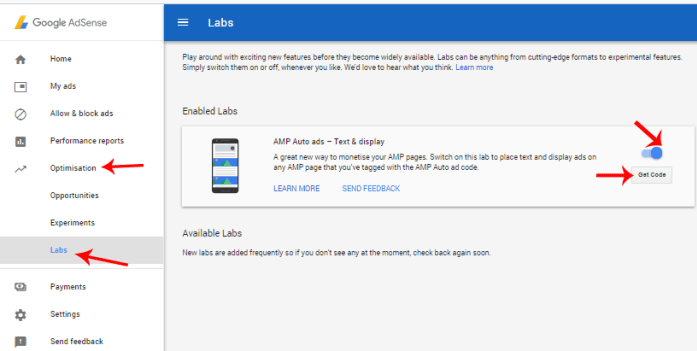
You will be provided with an AMP code you have to add to two places on your website.

AdSense has a guide to add this code to your site. However, you may find this difficult to implement without proper guidance if you are not a tech savvy. This post will help you add those AMP codes to your site even if you are new to coding.
You can add AMP codes by directly customizing your AMP plugin. But the most recommended method is to add your AMP code to your theme functions.
How to add AMP codes to theme functions
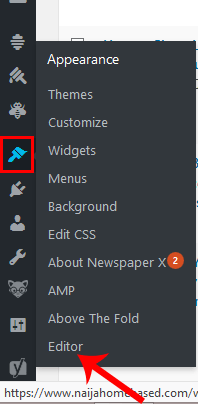
Make sure you are logged in to your WordPress dashboard. Hover your mouse cursor on the appearance icon and click on editor.
Make sure the theme you want to add your AMP code to is selected and click on Theme functions (functions.php).
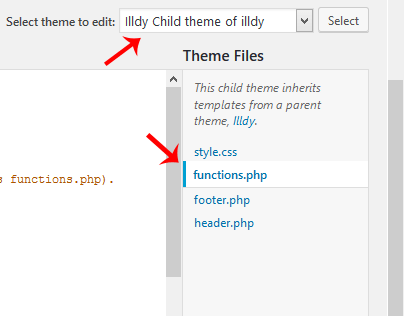
Recommended action: Add AMP code to a child theme and not a parent theme. Remove AMP code previously added to AMP plugin if that didn’t work.
Add the two codes below to your functions.php respectively, ensuring you replace //adsense_header_code and //adsense_footer_code with your AMP header and footers codes respectively.
//Adding Header Code in AMP pages in WordPress add_action(‘amp_post_template_head’,’nhb_amp_my_custom_head’); function nhb_amp_my_custom_head($amp_template) { ?> //adsense_header_code <?php }
//Adding Footer Code in AMP pages in WordPress add_action(‘amp_post_template_footer’,’nhb_amp_my_custom_footer’); function nhb_amp_my_custom_footer($amp_template) { ?> //adsense_footer_code <?php }
The final piece of code within your functions.php should look like the one in the image below.

With this method, Ads will begin to show up within your AMP pages. You can also verify this by visiting yoursite.com/page/amp/
If you intend to configure your AMP plugin directly (not recommended), here’s a guide for you.
How to add AdSense AMP code to AMP plugin
You can configure your plugin directly from your WordPress dashboard. However, it is advisable not to do that. The best way to configure your plugin is to Add the code using your FTP/SFTP client. In my case, I access my remote site using FileZilla. It is one of the best FTP clients out there.
Make sure you are logged in to your FTP client and ensure the location on the remote site points to /public_html/wp-content/plugins/amp/templates.
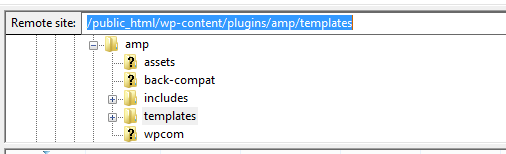
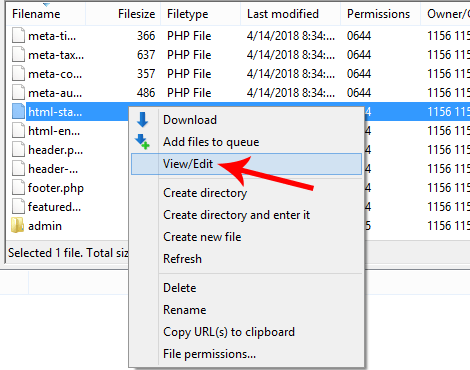
Under your amp>>template, you should see the filename html-start.php. right click on that file and click on edit.
Paste the AdSense header code directly below the <head> tag and the footer code directly below the opening <body tag, as shown in the image below.
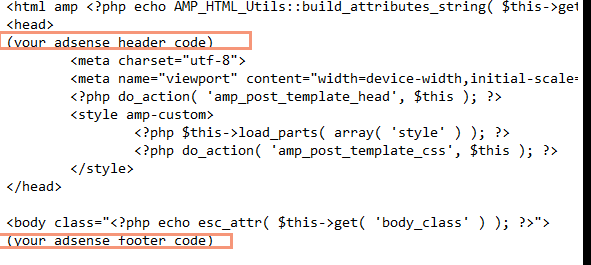
After pasting the code in your editor, save the settings to your server.
Google Ads should start displaying in your AMP pages immediately. You can verify this by visiting any of your site/blogpost/amp in a mobile phone browser (preferably chrome browser). Google ads may not be visible in search results until around 20-30 minutes.
That’s everything about adding auto ads to your AMP pages in WordPress. Feel free to communicate your challenges if you were unable to get this done.
Subscribe to this blog using the subscription box below. Also, follow us on Facebook and Twitter to get access to our exclusive tutorials faster than anyone else.
Content retrieved from: https://www.naijahomebased.com/adsense-amp-code-amp-pages-wordpress/.
Top 25 Niches For High Traffic On Google
Posted on August 15th, 2018
Today I’m going to show you the top 25 niches that you can target to get high volumes of traffic on Google. If you are doing any type of business on the internet, you already know how much traffic can be a crucial 500 lb Gorilla when it comes to generating leads and sales. Now … what if I showed you the top 25 niches that I’ve personally created websites on, to pull in high volumes of traffic on Google. Would this interest you? … Of course 🙂
When it comes to ranking websites on Google, it’s starting to get harder and harder to get ranked for those “evergreen” niches. Most of us get discouraged when we work hard on our SEO sites and see little to no results … Believe me, I’ve been there and did that. When it comes to SEO nowadays and getting traffic to your sites, you have to be a little bit more proactive in finding different niches that are highly popular and no one would even think about. What I’m going to give you today is pure GOLD and some of these niches have made me hundreds of dollars per day in automated revenues.
Top 25 Out-Of-The-Box Niches
- Minecraft
- Guitars
- Celebrities
- Holidays
- Costumes
- Chocolates
- Peppers
- Popular Mobile Apps
- Popular Mobile Games
- Tiny Homes
- Video Editing
- Jokes & Entertainment
- Smart Watches
- Coding / Development
- Accessories
- Piano Sheet Music
- Senior Dating
- Hair Braiding
- Korean Fashion
- Magic Tricks
- Home Designs
- Infertility
- Drug Tests
- DNA Testing
- Foreclosure
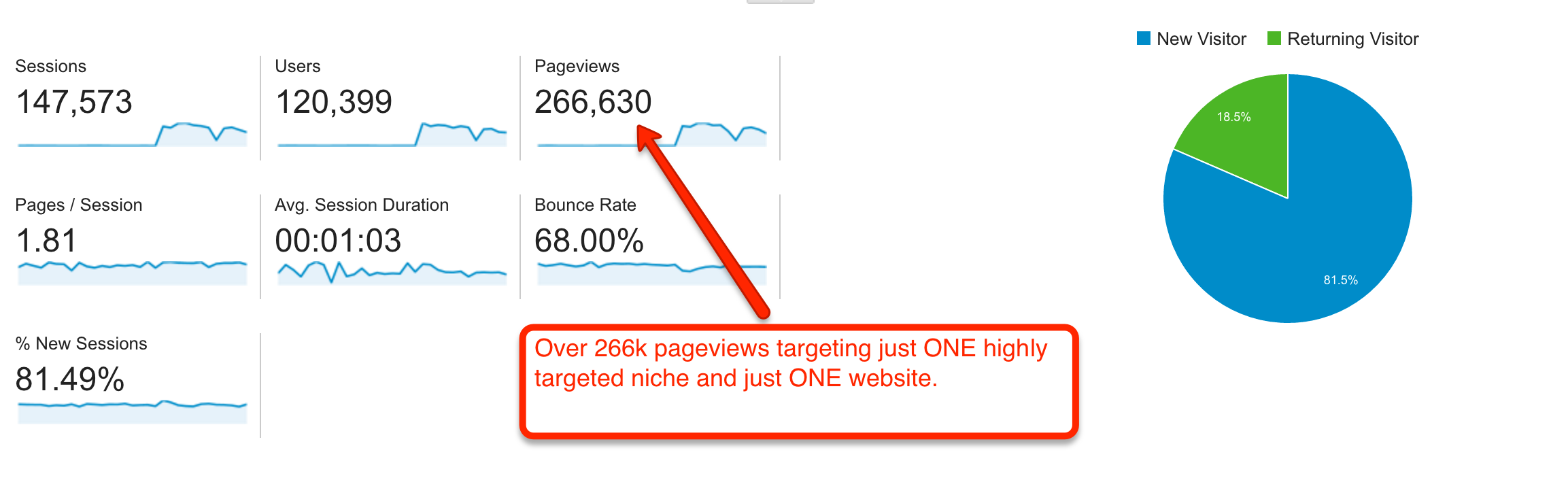
Believe it or not, you don’t always have to go for the evergreen and hard competitive niches out there. There are literally hundreds and thousands of different niches that people STILL search online today and you just have to use your creativity. I’ve had a few of these niches produce up to $9k+ per month in earnings because I was doing 2 things :
#1 – I was targeting the right marketing with little competition
#2 – I had the right offer for this market to solve their problems
You need to be able to solve people’s problems in order to take a slow site to being a highly successful site. Even if you have 100 visitors per day, you can still target the right offer to those visitors that are highly engaged in your contents. I would rather have 100 people who are highly engaged in my contents and will eventually turn into a buyer lead than 100,000 visitors that are untargeted and turn up to becoming 0 sales. Zero sales out of 0 is still … ZERO.
The secret formula to making money with select few niches
Step #1 – Find a niche that is catered to a specific pain in your market
Step #2 – Find a solution for that particular market (an offer / service). You can find such offers in different places online such as offervault.com / clickbank.com / cj.com / shareasale.com and many other affiliate networks and programs out there available. Just search on Google “niche + affiliate” or “niche + offer” (replace the word niche, with your niche of choice)
Step #3 – Provide that service to your audience in specific niche markets for optimal results. You can either put them through an email autoresponder or a series of landing pages and a funnel to get them to purchase your product. My best route has ALWAYS been to building an email list so that you can continually send them relevant offers and multiple offers throughout the life of the lead.
The point of this blog post is to open your eyes and show you that the world out there has a TON of great ideas and great niches with little to no competition (especially if you have a great offer already set). There are even niches out there that will show you how to “get more gold” in an online game and how to conquer your enemies an win games faster which makes 6-7 figures per year. As long as you have the traffic and the solution to your visitor’s problems, you will see great results come out of it.
It would also be a shame to write up this blog post without showing you a service that my team and I have developed over the course of 6+ years to perfect for you. I have been building these authority sites for myself as well as for clients for many years now and we have done extremely well for myself .. (See image below of just 1 day’s earning with Adsense)
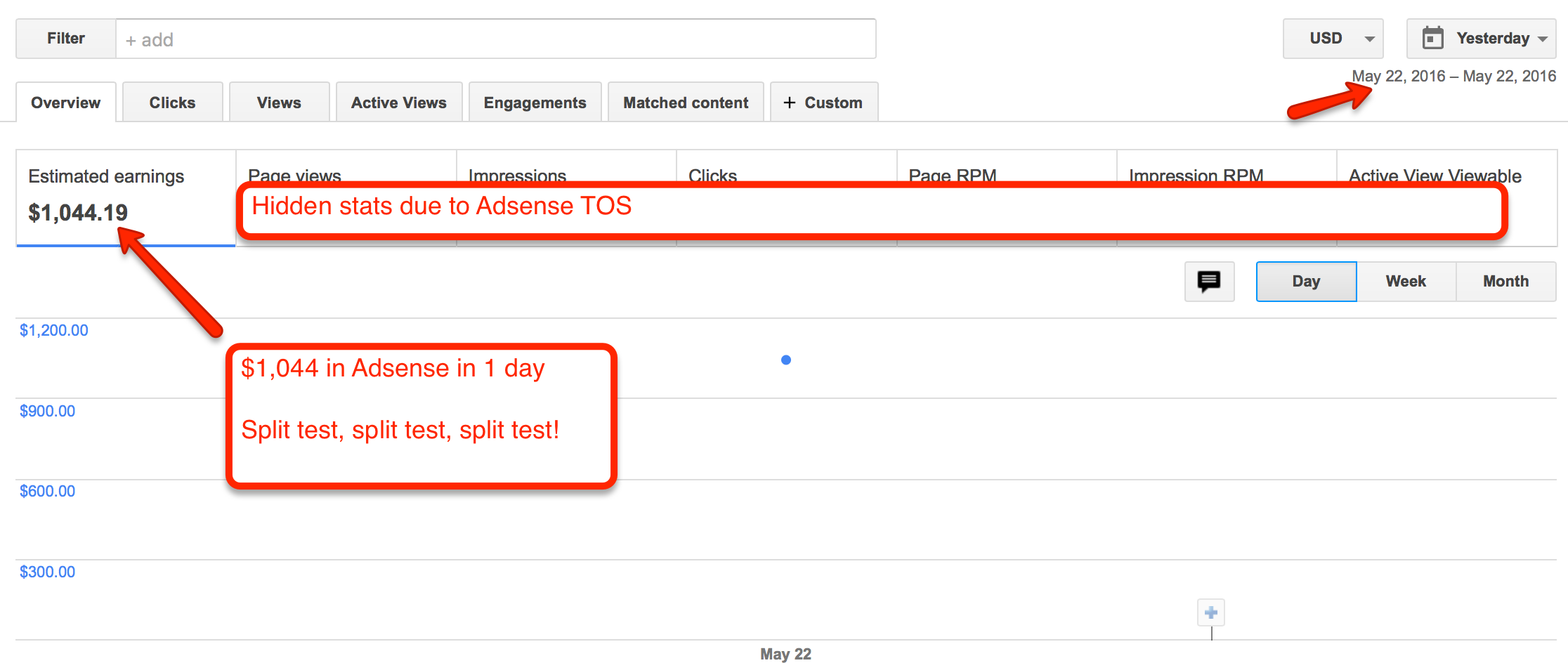
Check out the screenshot above showing $1,044 in earnings in just one day from these out of the box niches I’ve just showed you. When you’re targeting these niches out there, you can easily grab massive amounts of Google traffic and conquer your market. You really just have to think OUTSIDE the BOX and find GIANT communities that have a huge following (but no one is targeting) …
Once you find these niches, start building your authority site and start dominating multiple page #1 rankings on Google for search terms you would not even have thought about. There are literally billions of searches on Google every day and this is why I’m not afraid to share these niches with you! I’m not afraid of the competition or scarcity of these niches, because the market is just TOO BIG. I’m targeting for niches that NO ONE would ever think about and that’s because of the out of the box mentality that I’ve been focusing on.
It would also be a shame if I did not show you this offer as well. Some might say it’s a shameless plug, but it’s really a shame if you knew that I was doing this for myself and have not shown it to you …
If you would like to have stores like these and start generating 100% organic traffic from Google, we have created a service for our clients which we build out Authority sites 100% DFY (done for you). These sites have been proven to generate traffic, leads and sales for myself and the hundreds of clients we have provided this for. If you are interested in these stores, you can visit our Authority site services here.
What I would recommend even if you do not take our services, is that you go out there and find specific niches that you can be an authority of and generate contents for. Once you have dominated your market and have become an authority in that market, you need to attract your website visitors with offers that will help them SOLVE their PROBLEM. Remember … you don’t always have to go for evergreen niches such as diet / health / skin / fitness and do what EVERYONE else is trying to do. It’s always good to also have your own mindset and think of new ways to generate traffic in different markets. There are millions of people out there looking to find a solution for their problems. If you can gather these people who have problems and give them a solution to their problems, that’s where you will find success.
Content retrieved from: http://teovanyo.com/top-25-niches-for-high-traffic-on-google/.
How To Track Facebook Ads in Google Analytics [The Easy Way]
Posted on August 14th, 2018
Accurately tracking Facebook ads in Google Analytics consists of two primary steps:
- Clearly defined and consistent UTM Parameters so that you can identify Facebook traffic in Google Analytics
- Import cost, impression, and click data into Google Analytics so that you can map platform and session data
Analyzing performance holistically can be a daunting task given that Facebook and Google don’t always play nicely together.
But as a data-driven marketer accurately tracking Facebook ads in google analytics is crucial to understanding campaign performance.
So let’s explore a method for efficient Facebook ad tracking after we take a look at the current problem.
[video_page_section type=”youtube” position=”default” image=”http://track-n-test.com/wp-content/uploads/2018/08/youtube-banner1.jpg” btn=”light” heading=”” subheading=”” cta=”” video_width=”1080″ hide_related=”true” hide_logo=”false” hide_controls=”false” hide_title=”false” hide_fullscreen=”false”]https://www.youtube.com/watch?v=YGOehkY6VNk[/video_page_section]
Tracking Facebook Ads in Google Analytics is Time Consuming
Reporting works well within the confines of one specific vendor.
Google products, for example, work well together in that they allow the linking of Google Analytics (reporting) and Adwords (advertising platform), enabling one to see all data seamlessly in a single reporting interface.
Although Facebook has become a prominent advertising platform, it does not, like Google, have a diverse product portfolio and does not provide reporting outside of platform-specific metrics.
Note: Facebook does provide a reporting and Analytics Tool that is worth exploring.
Since there is no way to seamlessly connect the two platforms, what are our options?
- Analyze and report on each platform separately
- Map the data in a spreadsheet
- Perform manual exports & GA custom imports
All of these options, even with a sound system in place, can be extremely time-consuming, taking away from analyzing and optimizing campaign performance.
In this article, I will go over three available Google Analytics features that you can leverage when tracking Facebook ads in Google Analytics:
- Data Import
- Calculated Metrics
- Custom Reports
It Starts with Proper Campaign Tagging
Let’s go back to the beginning.
When setting up Facebook campaigns, many digital marketers use the Google Campaign URL builder to generate UTMS that look something like this:
/http://easyautotagging.com/?utm_source=facebook&utm_campaign=Spring%20Launch&utm_medium=cpc&utm_content=lifestyle%20image
Aside from the manual effort required, there is nothing wrong with this approach.
That said, defining the source as ‘facebook’ and medium as ‘cpc’ provides limited insight into audience/targeting performance.
[video_page_section type=”youtube” position=”default” image=”http://track-n-test.com/wp-content/uploads/2018/08/youtube-banner1.jpg” btn=”light” heading=”” subheading=”” cta=”” video_width=”1080″ hide_related=”false” hide_logo=”false” hide_controls=”false” hide_title=”false” hide_fullscreen=”false”]https://www.youtube.com/watch?v=ck5VEYhoUFo[/video_page_section]
Using Available Facebook Campaign Fields
There is a more straightforward way to tag your URLs without having to come up with a unique naming convention for UTM fields.
The easiest way to tracking Facebook Ads in Google Analytics is to create unique naming conventions for your Facebook Campaigns, Ad Sets, and Ads that you then use to tag your UTMs respectively.
Below is an example of what the UTM fields and their respective Facebook values would look like:
Campaign – “Campaign Name”
Source – “Facebook” or “Instagram”
Medium – “Ad Set Name”
Ad Content – “Ad Name”
Note: Using Ad Set Name (read audience) as the medium value can mess with your default and/or custom channel grouping in Google Analytics. You can either modify your channel grouping or map custom parameters to custom dimensions.
There are two ways you can go about tagging your campaigns:
Bulk exports/imports via the power editor
EasyAutoTagging which automates tagging all of your Facebook campaign ad URLs
I go into details of how you can do this in How to Track Granular Facebook Campaign Performance in Google Analytics.
Linking your Google Analytics Account
So, how can you see this data in Google Analytics?
First, we have to import Facebook campaign cost, impression and click data into Google Analytics in one of two ways:
- Manual Import
- Automated Import
Option 1: Manual Import
Without EasyAutoTagging, you are limited to exporting Facebook campaign data daily, weekly, or monthly, then manually importing it into Google Analytics via Data Imports.
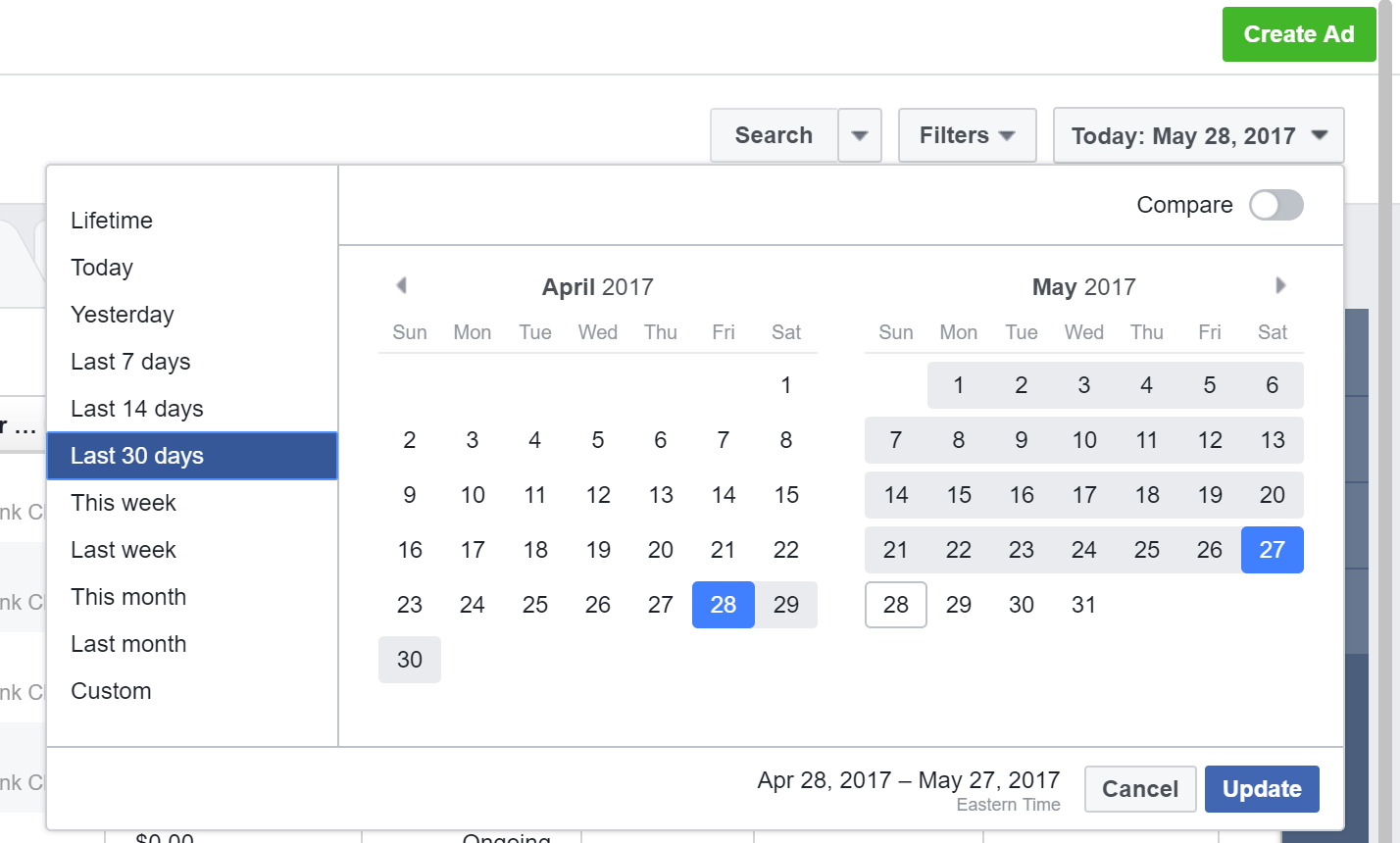
First, go to your Facebook accounts Ads Manager and select your desired date range:
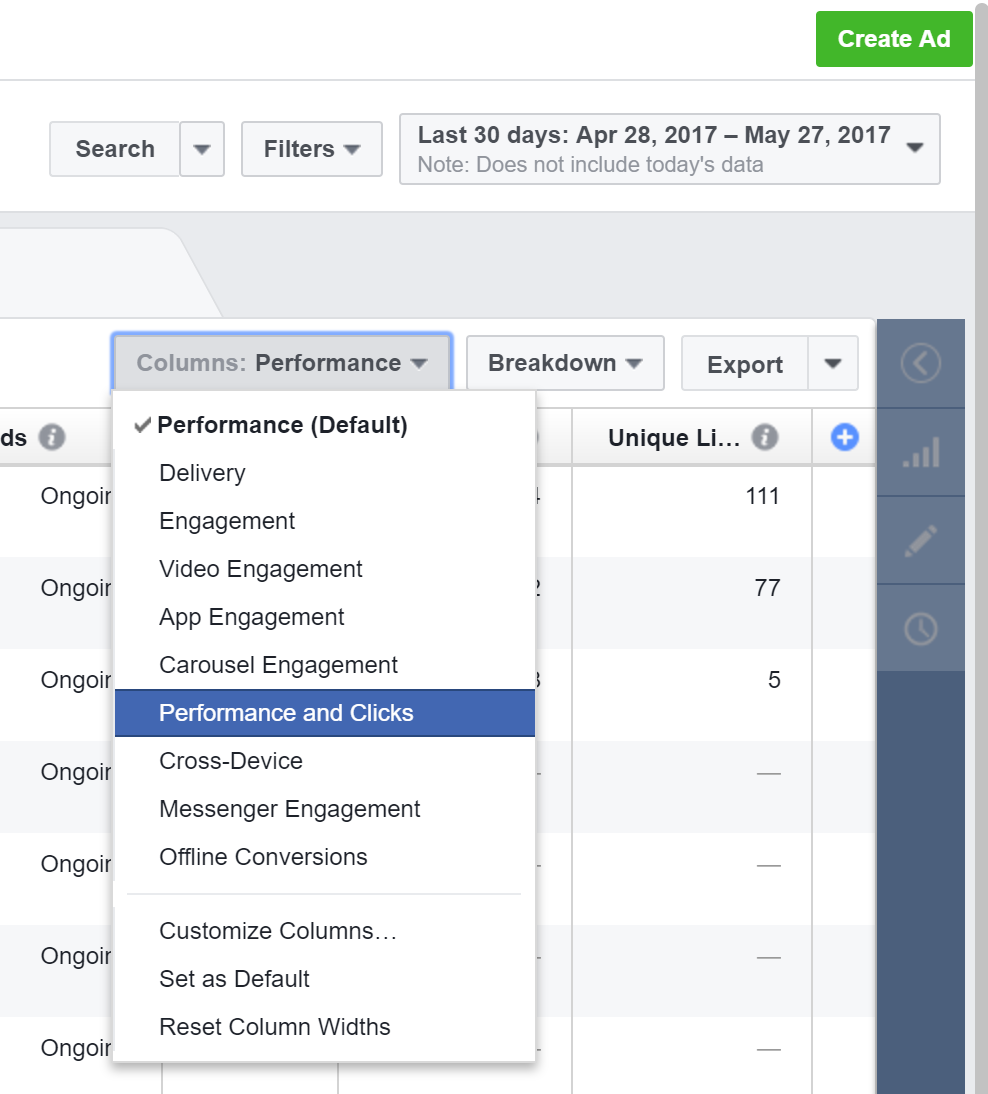
Select the Ads tab across the top and Go to Columns and Select Performance and Clicks:
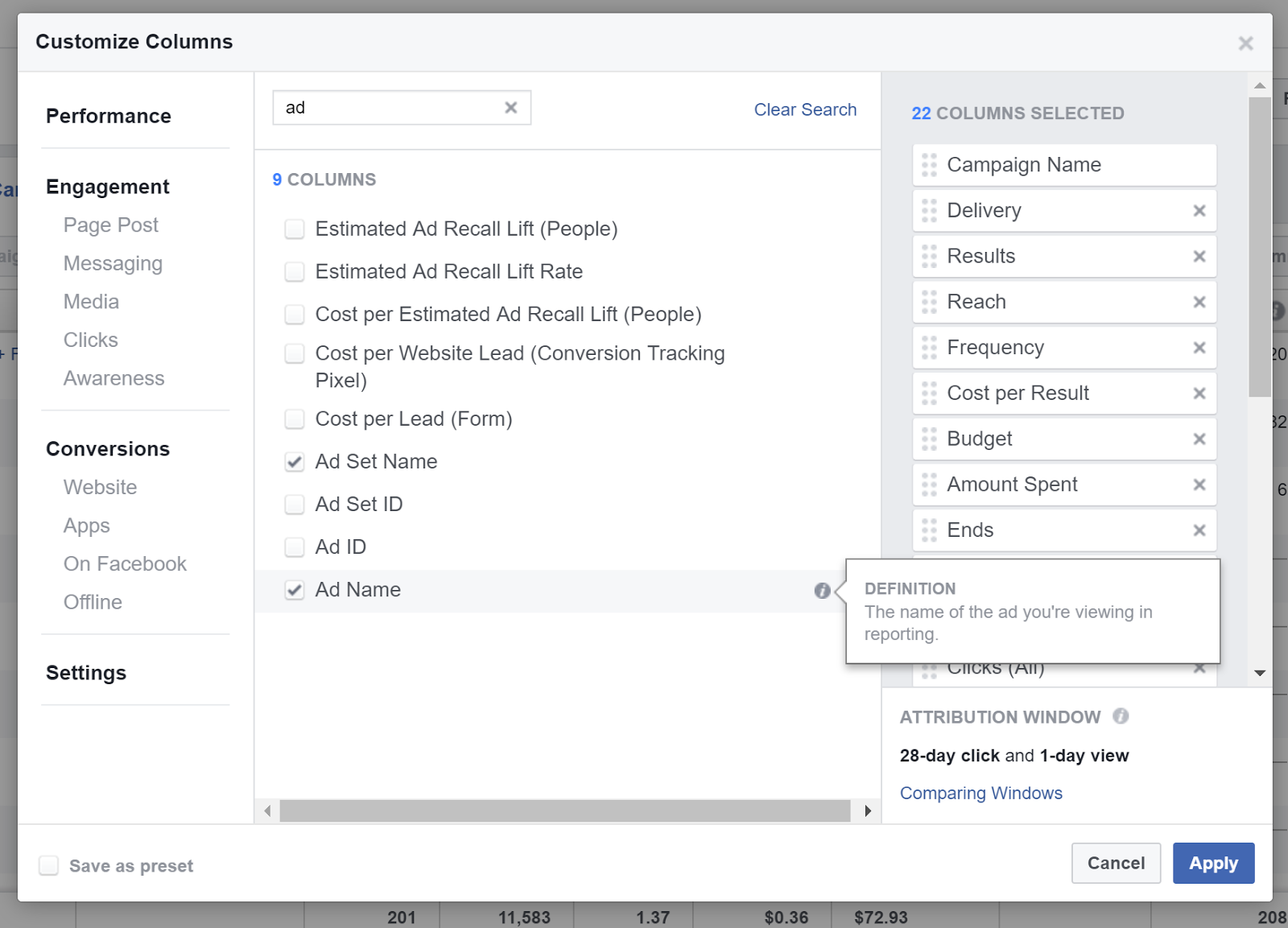
Customize columns and add Campaign Name, Ad Set Name, and Ad Name:
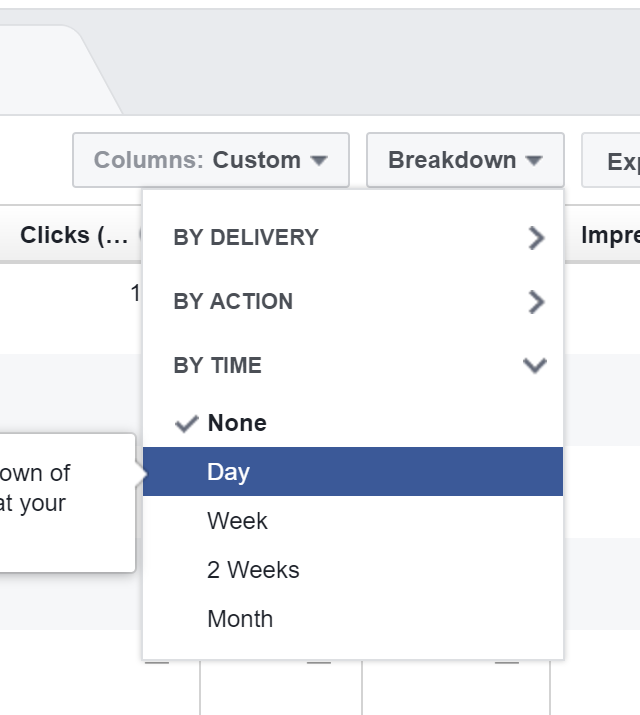
Click Breakdown > by time > Day
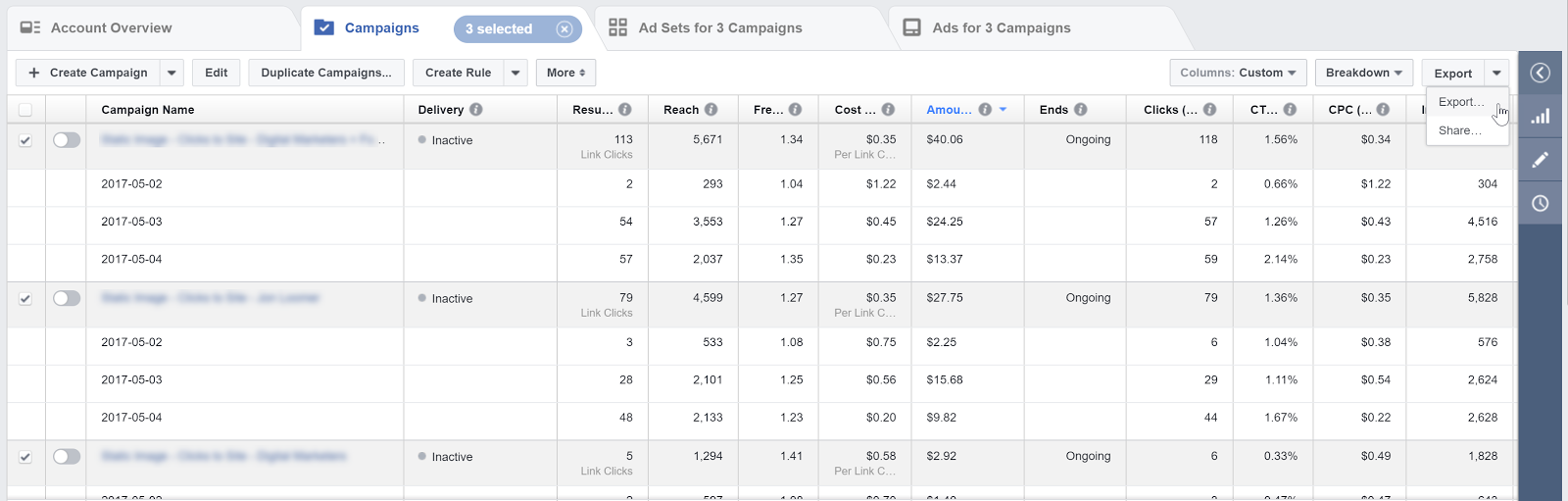
Select the campaigns you would like to import and export these to a CSV file:
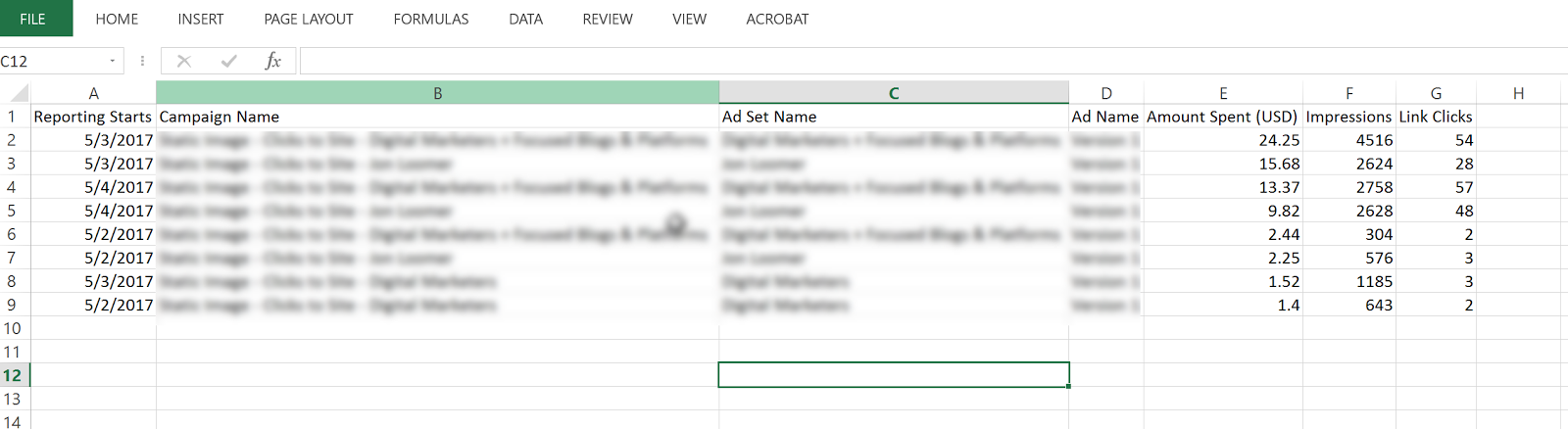
Open the CSV and delete all columns except:
Day (Reporting Starts), Amount Spent, Campaign Name, Ad Set Name, Ad Name, Impressions, Link Clicks
Once you have these cleaned up, head over to Google Analytics and go to Admin > Data Import
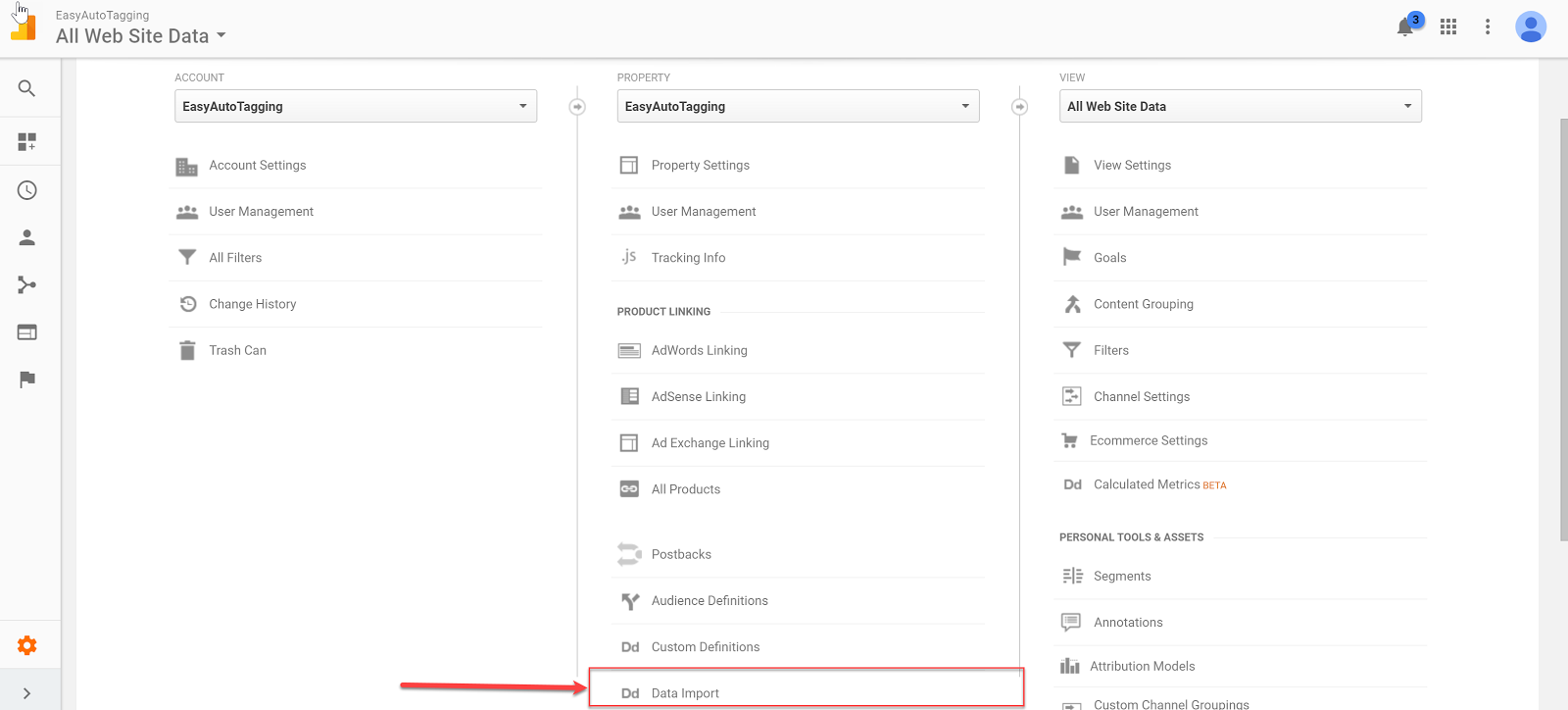
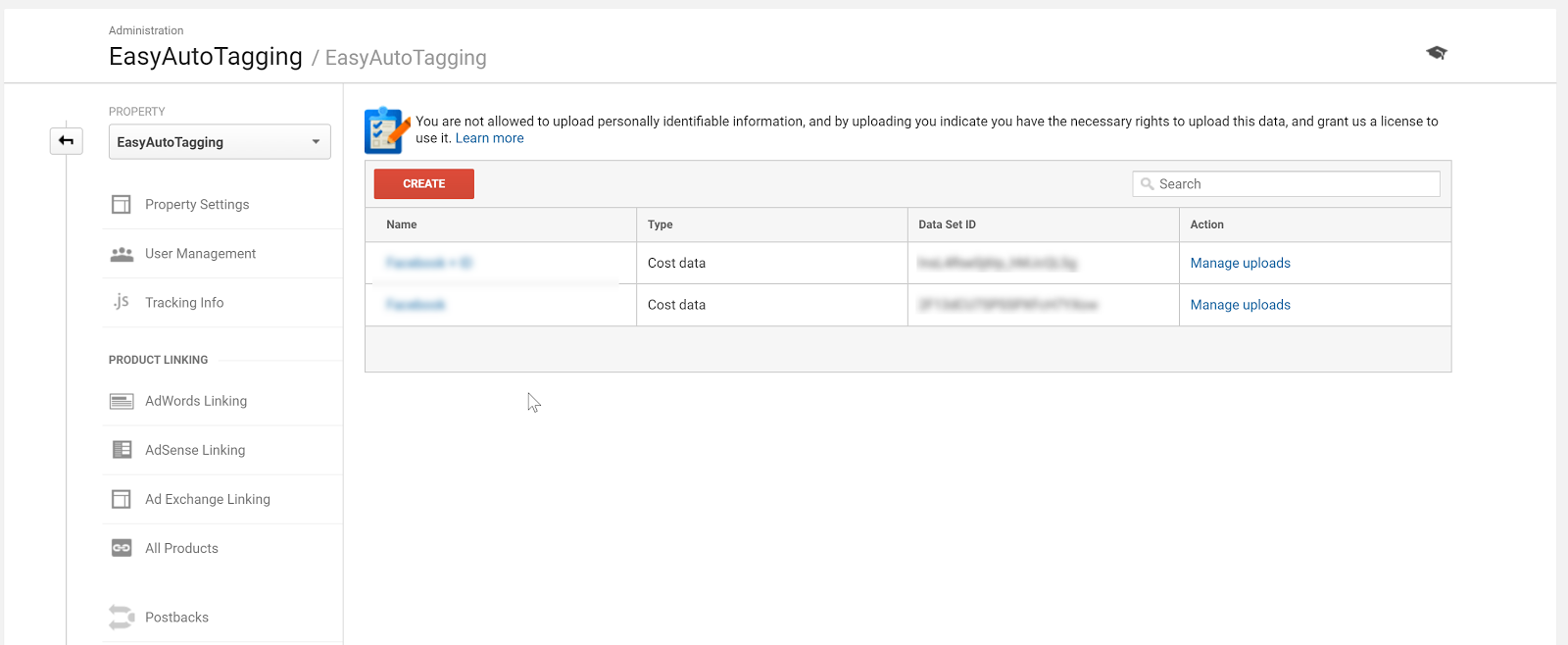
Select your cost import dataset. I go into the detail on how to set up cost, impression, click DataSet in Setting Up Cost Data Sets.
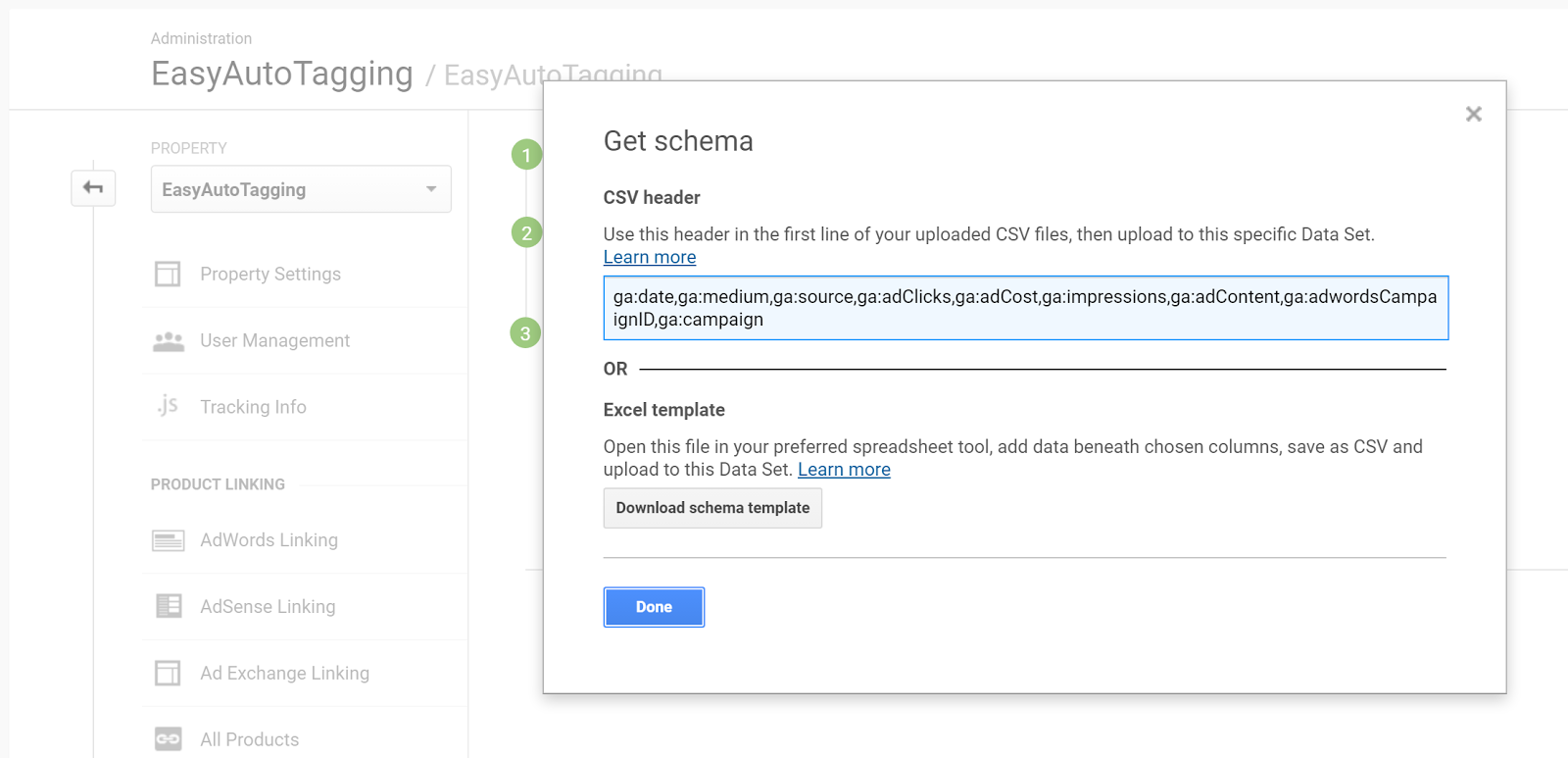
Copy and paste the headers into your CSV respectively of column values.
For source, you need to manually add the source as Facebook and/or Instagram depending on campaign/ad set placement.
Format the date column from 5/3/2017 to this 532017
Your final results should look like this:
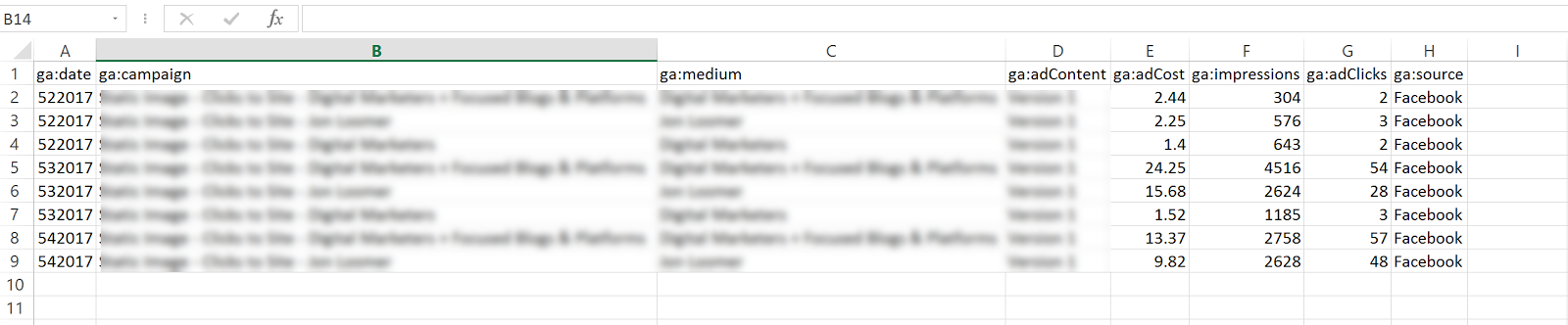
Go back to Data Imports in Google Analytics and click on manage uploads > Upload File and upload your CSV doc.

Option 2: Automated Daily Import
With EasyAutoTagging’s GA Connector you can easily link your Facebook campaigns to Google Analytics using the same UTM values assigned when generating URL parameters.
Just follow the set up in How to Track Granular Facebook Campaign Performance in Google Analytics
With automated daily imports of your Facebook campaign data, you can now generate detailed insights across platform metrics, and session behavior in a single location when tracking Facebook Ads in Google Analytics.
Ok let’s get started:
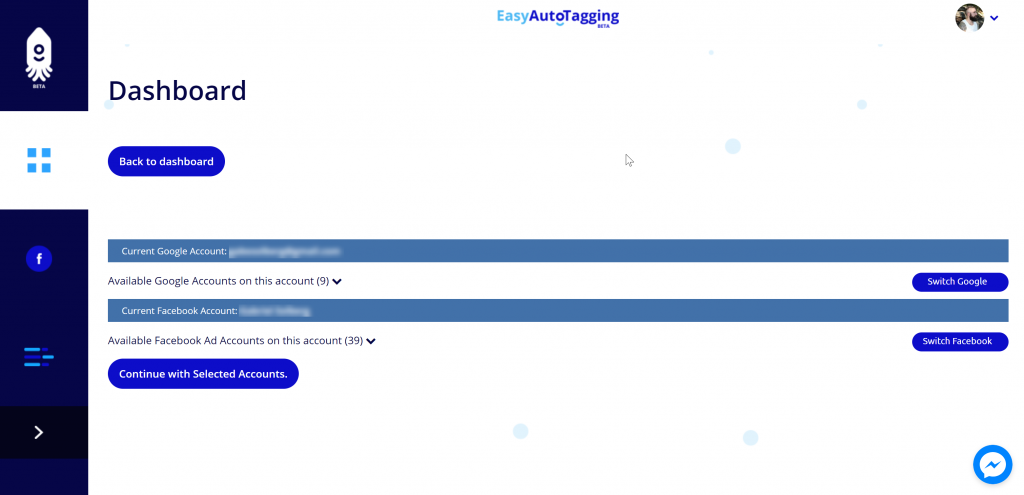
Log in to EasyAutoTagging.
Create a new connection group and connect to your desired Google Analytics and Facebook accounts.
Click continue.
Next select your Google Analytics Account, Property and DataSet and define your Parameter Values. (source, medium, campaign, content)
Note: You can choose a pre-defined or enter custom parameter values. To ensure proper mapping, please make sure that you import parameter values exactly match your defined UTM parameter values.
Assign a name and save the Connection Group.
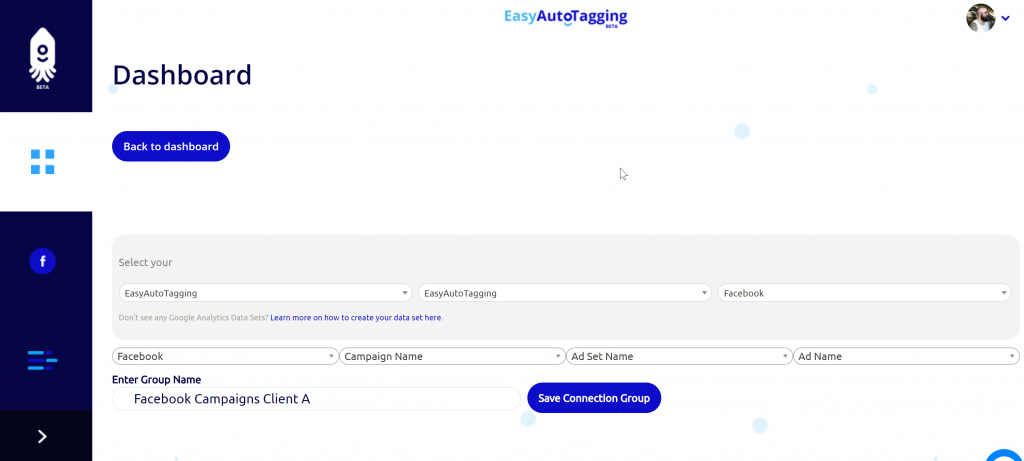
Note: If you do not have a data set created you need to create one in Google Analytics first. You can see how to do this in Setting Up Cost Data Sets
Once you saved the connection group, you can add facebook campaigns as needed.
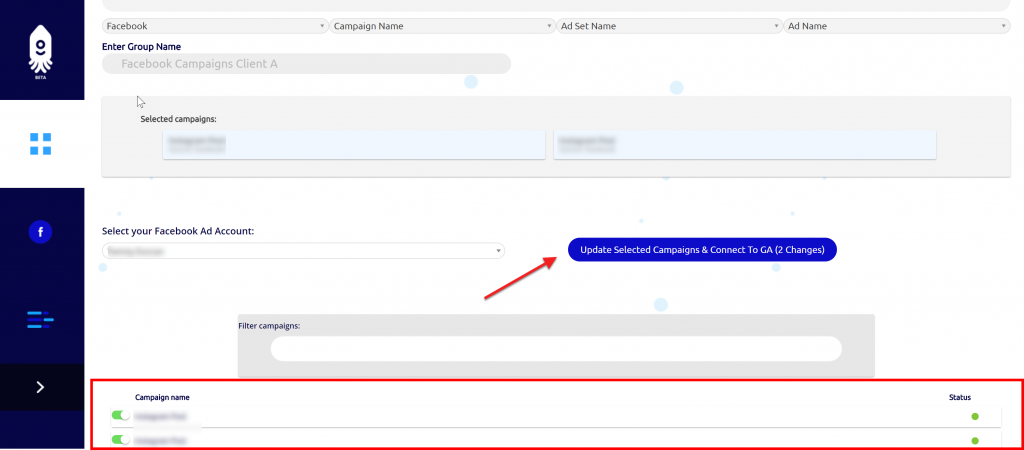
You will get notified via email once the initial upload of all campaign data to date has completed and all connected campaigns will continue to import data daily.
Seeing the data in Google Analytics
Ok, now that we have all campaigns tagged and are tracking Facebook Ads in Google Analytics, where can we see our Facebook ad analytics?
Let’s start with two default views that Google Analytics gives us:
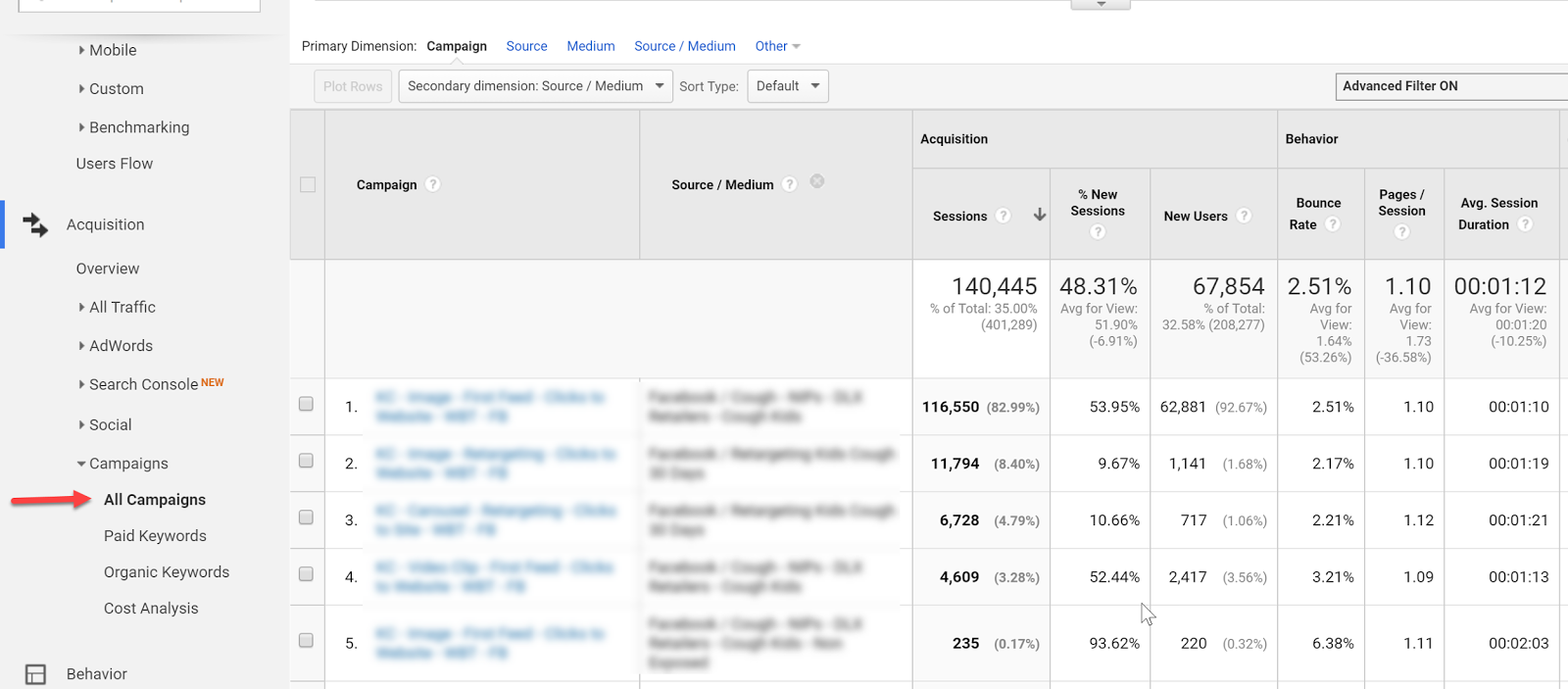
Campaign View
In the campaign view, we can see an overview of campaign performance.
For more granularity, we can add secondary dimensions to see ad content or source/medium breakdowns.
Cost Analysis View
The Cost Analysis View shows cost, impression, clicks, CTR, CPC, and some primary on-site metrics on a campaign and/or source/medium breakdown allowing us to analyze platform alongside sessions data.
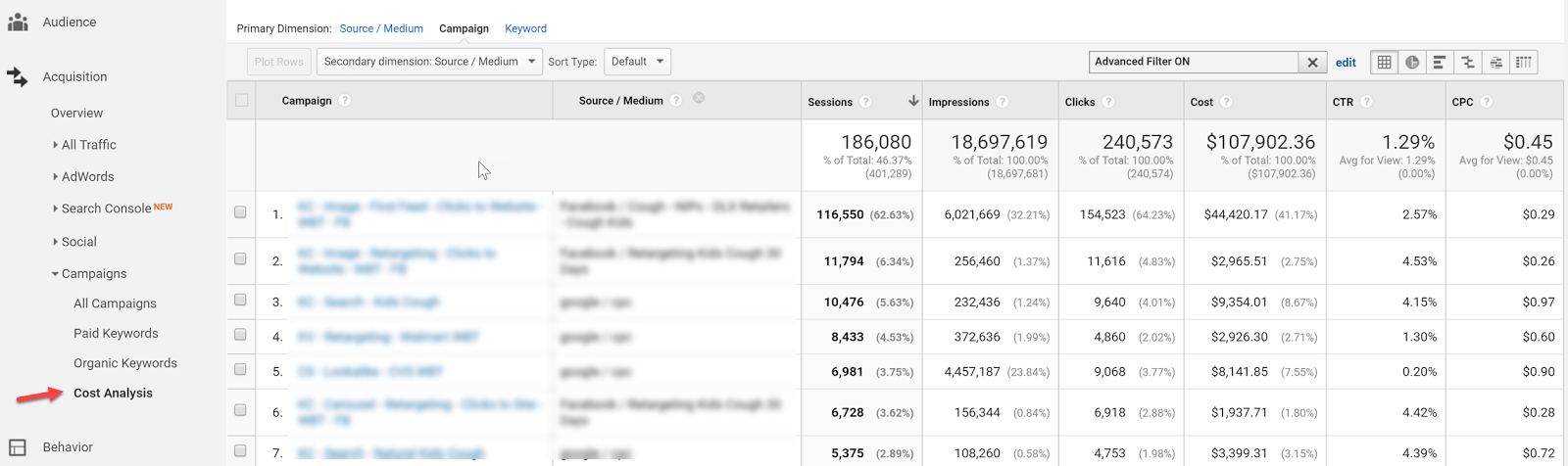
Both of these views, although isolated from each other within Google Analytics, can already provide a wealth of insights, but let’s take tracking Facebook ads in Google Analytics one step further with Calculated Metrics and Custom Reports.
Calculated Metrics
Google defines Calculated Metrics as follows:
Calculated Metrics are user-defined metrics that are computed from existing metrics and drive more relevant analysis and enable greater actionability without leaving the product.
Ok, so here are a few example metrics that we might want to see in our reports.
Note: Keep in mind that one can only create 5 calculated metrics per view in the standard Google Analytics version.
CPV – cost per visitor (this will always be different than CPC since many platforms have a clicks to session drop off up to 25%)
Goal
CP Goal
Goal Conversion Rate
Let’s get started…you can find calculated metrics in your Admin section
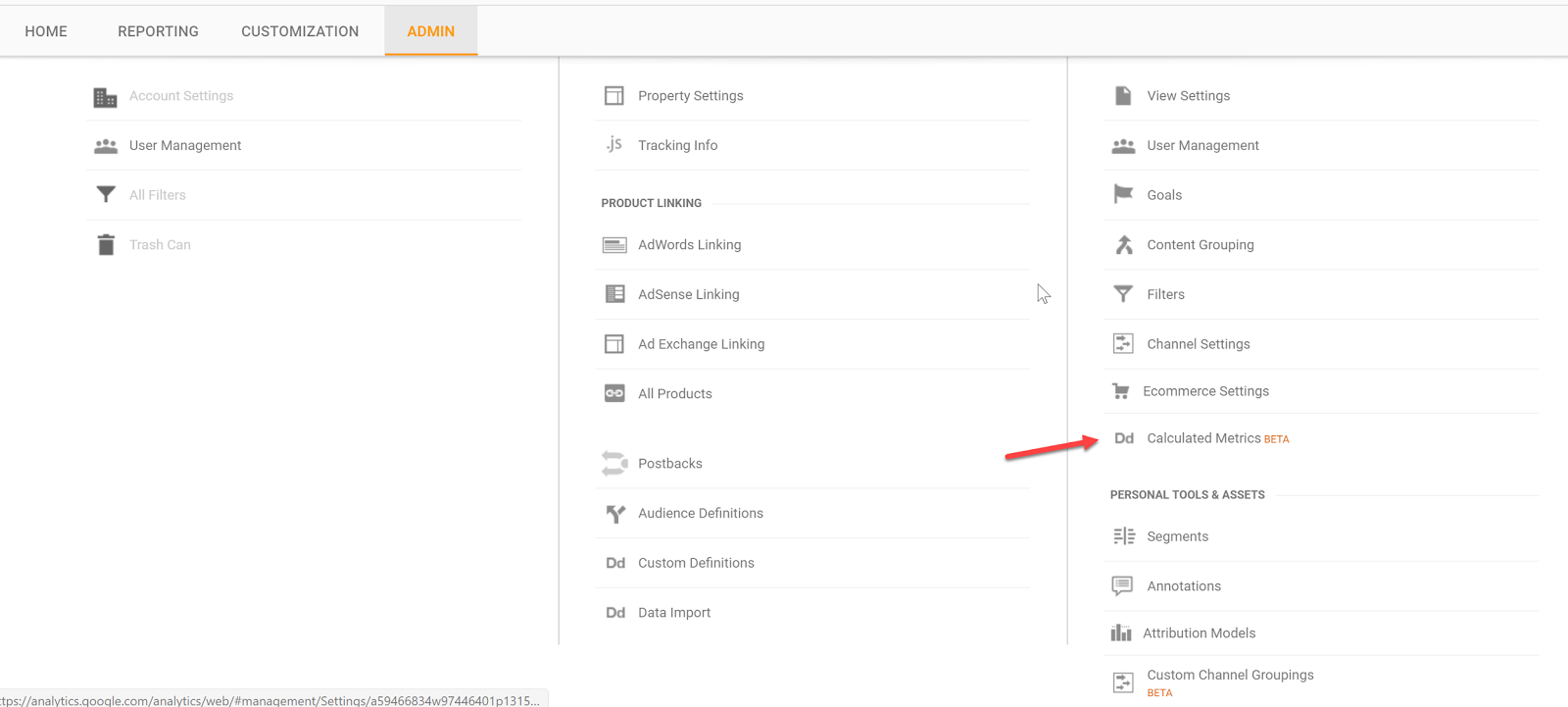
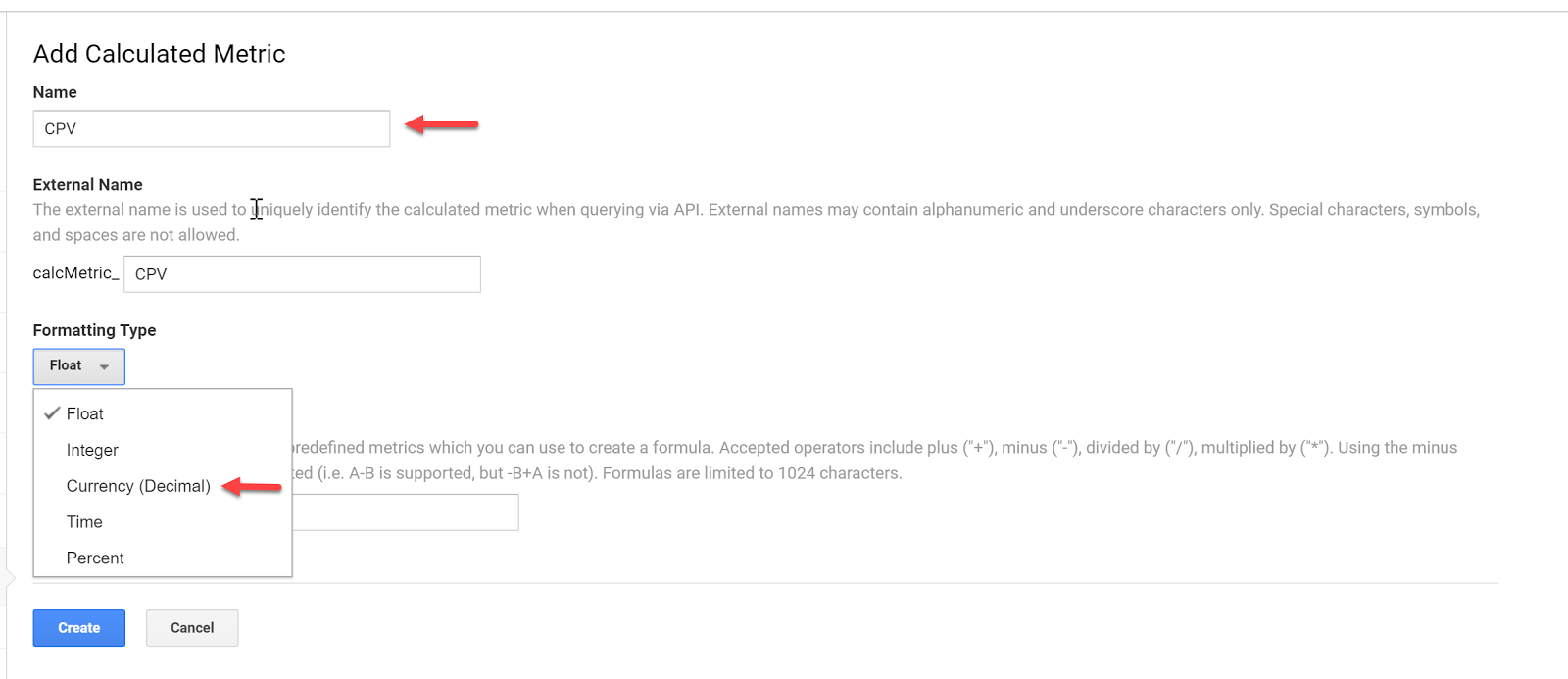
Add a new custom calculation, call it CPV and define the formatting type as Currency (Decimal):
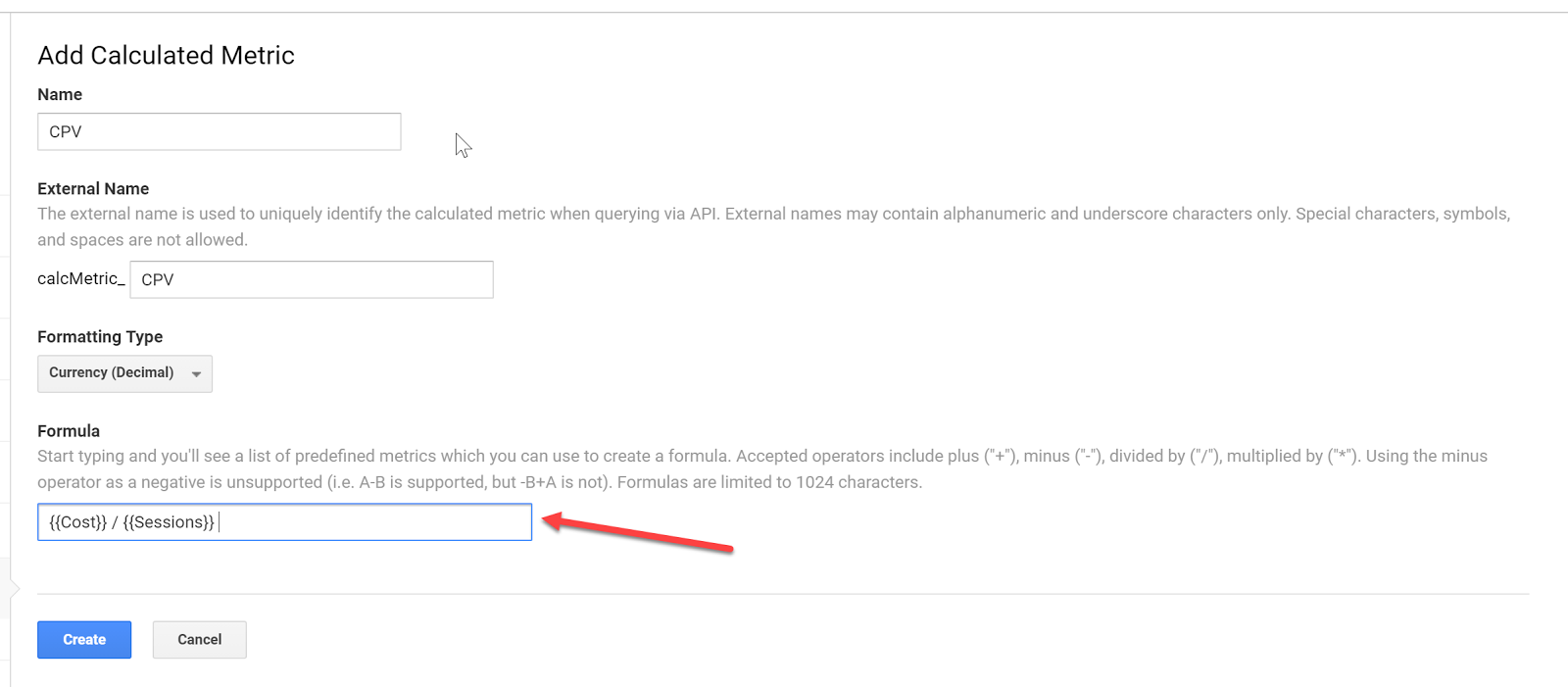
Enter the formula and click Create:
Do the same for your specific goal conversion rate and cost per conversion. In this case, we will use engaged user.
Now that we have the custom calculations in place, we can go ahead and set up our custom reports.
Custom Reports
Having all data aggregated doesn’t mean you have to use Google Analytics for reporting – it just makes it easier to pull all your Google Analytics Facebook data from one place.
But for the sake of this article, let’s stick with custom reports within Google Analytics.
Let’s go ahead and set up a custom report.
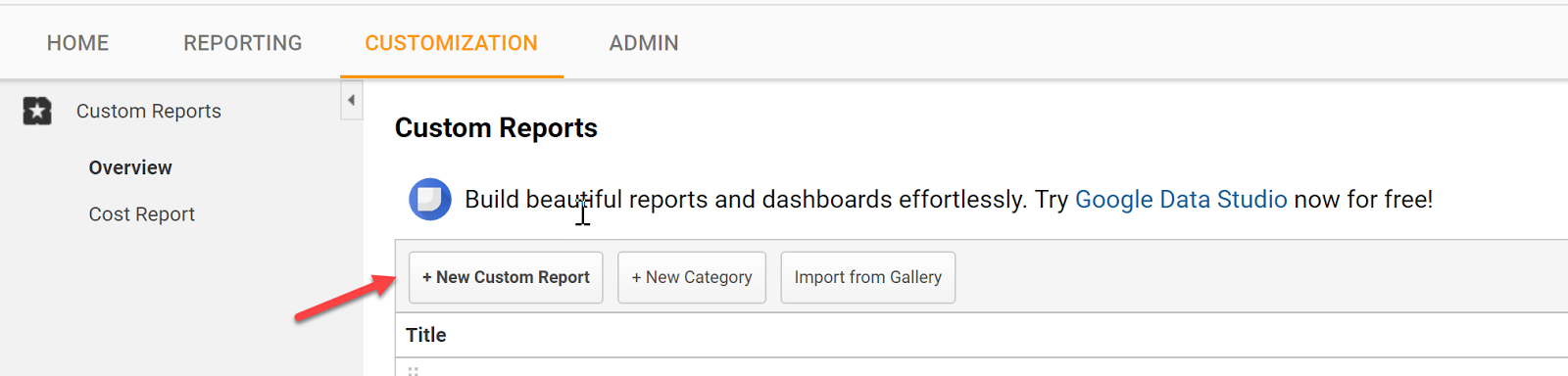
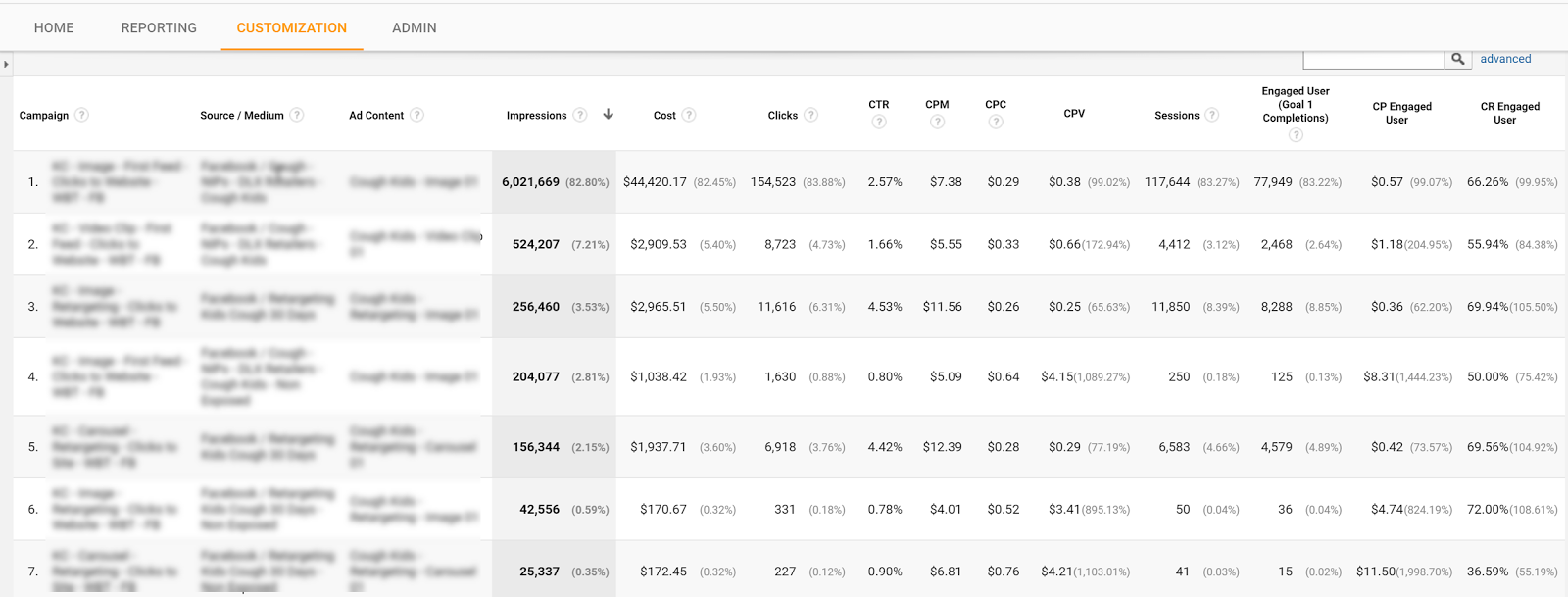
Go to Customization and click create a New Custom Report
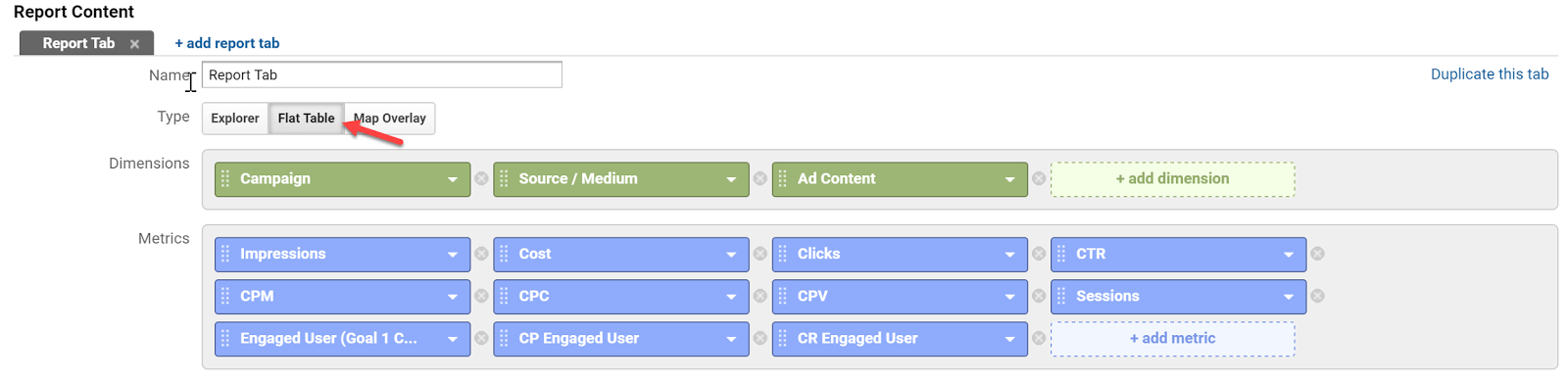
Select a Flat Table and add:
Dimensions:
Campaign | Source / Medium | Ad Content
Metrics:
Impressions | Cost | Clicks | CTR | CPM | CPC | CPV | Session | Engaged Users | CP Engaged User | CR Engaged
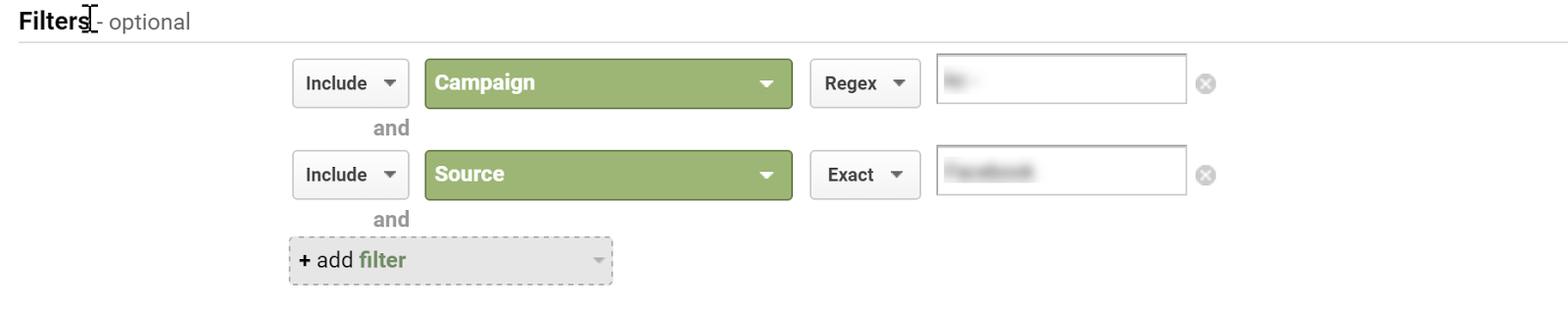
Apply Filters as needed:
Select your view:
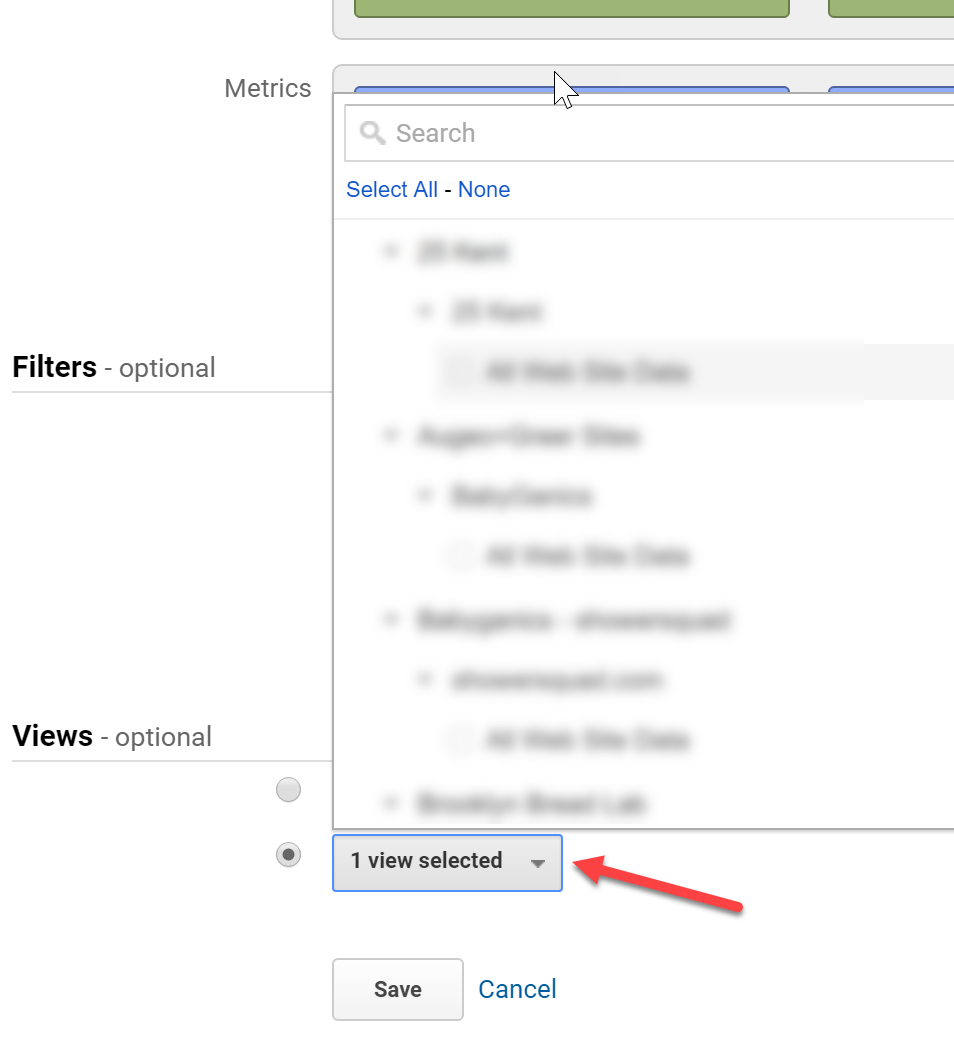
Label the report and hit save.
You can now see all of your campaign platforms and on-site data in one place.
Tell us in the comments what you have done to make tracking Facebook ads in Google Analytics a seamless process?
Content retrieved from: https://easyautotagging.com/tracking-facebook-ads-google-analytics/.
Craving Yellow a young Kenyan creative innovator’s authentic soul-searching blog Will Inspire You To e-commerce success.
Posted on June 21st, 2018
She’s articulated, smart and self-aware.”I think my journeys have matured me,” she says. “Sometimes I believe I’m 30 years older than I really am.”Tongoi needed to be independent from a young age as she moved away from home, to South Africa for education, at age 17. Then it was off to the US for additional studies in political science and then to Australia for her first job — where she changed direction into social network marketing and online community administration. She finds herself back in her home country of Kenya, occupied nurturing a growing company that began when her creative character sought an outlet on the journey of self-discovery she found herself undertaking.While in the US she struck pieces on the self-portraiture of women of color and what it meant to be embodied in the manner that they were.Today Craving Yellow is surely a success by any blogger’s standards

How can you turn a successful and authentic online presence into a profitable business venture? In Tongoi’s case: By diving head-first into the opportunity, without being quite fully prepared.”It has only been four months!” She chuckles as she shares the story. In her interactions with local businesses in this area she began gaining an awareness of the business and one of her mentors asked why she wasn’t producing her own merchandise to fulfill consumer needs.This was the birth of her Craving Yellow beauty box — a product which combines the ease of carefully chosen beauty products for natural hair care and information about the best way best to stick to the treatment regime.She spent about 750,000 Kenyan shillings (US$7,400) on the goods for its first consignment of boxes using an eight-week payment arrangement.

“It was a massive risk I took. I have done no market research. I took on these products on a verbal agreement, without a contract in place. I don’t consider myself a pro marketer. However, I did sell them in eight months,” she says.Observing that very first sales drive, a follower in the US commented on her blog asking if she could buy the beauty box. Her site platform was e-commerce allowed, but she had no agreements or plans for international delivery.”I started calling different providers for transport after the orders were ready, but then got a call from Vicky Wambui from DHL, inviting me to get a meeting,” Tongoi states.The DHL Express team were quite hands-on. They spoke Tongoi through all of the requirements and even physically helped pack the dispatch boxes at the same stage. A valuable negotiated shipping rate, provided because the organization believes in Tongoi’s vision, led to the present reality where one in every five boxes currently ordered is for international shipment.Considering that the item is a luxury high-end beauty box selling for 5,000 Kenyan shillings ($49), this has increased Craving Yellow’s potential market and made the company instantly more viable.

Tongoi admits that she’s not the stereotypical small business type. She is, at her heart, a creative person. For my organization, I think if I keep the human desire at the middle, the money will follow along with that the money is just like a thank you for the support provided and that really meets that a need has been there,” she says.In a really short space of time Craving Yellow has evolved from being a popular blog to becoming a new for organic beauty product customers — offering specially curated goods in the beauty shop or workshops on the subject from the Craving Yellow classes.Lately Tongoi added her first branded merchandise — the Craving Yellow shampoo pub and lace bonnets. This is a collaboration with well-known firms in Kenya that have a strength in particular goods and then produce these items for her.”I feel that as we get the delivery arrangements perfect and the goods on offer precisely right, the worldwide buyers would readily supersede my regional buyers — they do have the buying power,” Tongoi states of their future plans.